⚙️ Main Configuration (config.json)
Hot Reload
Most changes can be applied without restarting the server using /essentialsplus reload
File Information
📁 File Location: mods/fof1092_EssentialsPlus/config.json
🔙 Back to Configuration Overview
The config.json is the main configuration file for EssentialsPlus. It contains all plugin features, settings, and customization options. This file can be manually edited to customize your server's behavior.
📋 Configuration Structure
The main configuration file for Essentials Plus.
Example:
{
  "version": "1.17.0",
  "debugMode": false,
  "firstJoin": {
    "enabled": true,
    "messages": [
      "<#f495ee>==============================</#FFAA00>",
      "<#f495ee>Welcome to the Server, {player}!</#FFAA00>",
      "<#f495ee>This is your first time joining us.</#FFAA00>",
      "<#f495ee>We hope you enjoy your stay!</#FFAA00>",
      "<#f495ee>==============================</#FFAA00>"
    ],
    "broadcastToAll": true,
    "showMotdIfEnabled": true,
    "kits": [
      "firstjoin"
    ],
    "runAsServer": [],
    "runAsPlayer": [],
    "teleport": {
      "enabled": false,
      "warpName": "firstjoin"
    }
  },
  "joinandquit": {
    "enabled": true,
    "joinMessage": "<#55FF55><bold>+ </bold></#55FF55><#FFAA00><bold>{player} joined the server.</bold></#FFAA00>",
    "quitMessage": "<#FF5555><bold>- </bold></#FF5555><#FFAA00><bold>{player} left the server.</bold></#FFAA00>"
  },
  "chat": {
    "enabled": true,
    "ignoreChatCancellations": true,
    "syncWithGroupSystem": true,
    "groups": {
      "default": "<#00AA00><bold>[<#FFFFFF>Default</#FFFFFF>] {player}: </bold></#00AA00><#AAAAAA>{message}</#AAAAAA>",
      "moderator": "<#5555FF><bold>[<#FFFFFF>Moderator</#FFFFFF>] {player}<#FF5555>: </bold></#5555FF><#AAAAAA>{message}</#AAAAAA>",
      "admin": "<#FF5555><bold>[<#FFFFFF>Admin</#FFFFFF>] {player}: </bold></#FF5555><#AAAAAA>{message}</#AAAAAA>",
      "vip": "<#e89d1f><bold>[<#FFFFFF>VIP</#FFFFFF>] <gradient:#e89d1f:#e4e95d:#e89d1f>{player}</gradient>: </bold></#e89d1f><#AAAAAA>{message}</#AAAAAA>"
    }
  },
  "msg": {
    "senderFormat": "<#FFFF55><bold><italic>MSG</italic></bold></#FFFF55><#55FF55><bold> > </bold></#55FF55><#FFAA00><bold>{receiver} </bold></#FFAA00><#FFFFFF><italic>{message}</italic></#FFFFFF>",
    "receiverFormat": "<#FFFF55><bold><italic>MSG</italic></bold></#FFFF55><#FF0000><bold> < </bold></#FF0000><#FFAA00><bold>{sender} </bold></#FFAA00><#FFFFFF><italic>{message}</italic></#FFFFFF>"
  },
  "ignore": {
    "enabled": true,
    "silentModeDefault": false,
    "duration": {
      "default": "1d",
      "maximum": "30d"
    },
    "blockedInteractions": {
      "chat": true,
      "messages": true,
      "mail": true,
      "tpa": true
    }
  },
  "homes": {
    "limitsEnabled": false
  },
  "kits": {
    "hideKitsWithoutPermission": true
  },
  "warps": {
    "hideWarpsWithoutPermission": true
  },
  "near": {
    "radius": 50.0,
    "showDistance": true
  },
  "motd": {
    "messages": [
      "<rainbow>==============================</rainbow>",
      "<bold><gradient:#e89d1f:#e4e95d:#e89d1f>Message of the Day</gradient></bold>",
      "<#FFFFFF>Welcome to our server!</#FFFFFF>",
      "<#FFFFFF>Have fun and follow the <green>/rules</green> !</#FFFFFF>",
      "<#FFFFFF>Visit us on <#7289DA><bold>Discord</bold></#7289DA>:</#FFFFFF> <url:https://discord.gg/w2XqCBfsnx><gradient:#00acf2:#7289DA:#00acf2>https://discord.gg/w2XqCBfsnx</gradient></url>",
      "<rainbow>==============================</rainbow>"
    ],
    "enabled": true
  },
  "groupSystem": {
    "syncWithLuckPerms": true,
    "fallbackGroup": "default",
    "groups": [
      {
        "name": "vip",
        "priority": 50,
        "prefix": "<#e89d1f>",
        "suffix": "</#e89d1f>",
        "tag": "<#e89d1f><bold>[<#FFFFFF>VIP</#FFFFFF>]</bold></#e89d1f>"
      },
      {
        "name": "default",
        "priority": 0,
        "prefix": "<#00AA00>",
        "suffix": "</#00AA00>",
        "tag": "<#00AA00><bold>[<#FFFFFF>Default</#FFFFFF>]</bold></#00AA00>"
      }
    ]
  },
  "rtp": {
    "useWorldSpawnAsCenter": true,
    "maxRadius": 500,
    "minRadius": 100,
    "maxChecks": 10,
    "enabledWorlds": [
      "*"
    ],
    "defaultWorld": {
      "enabled": true,
      "name": "default"
    }
  },
  "broadcast": {
    "format": "<bold><gradient:#f83d5c:#f83d5c:#fd4b2f>[BROADCAST]</gradient></bold> "
  },
  "spawn": {
    "spawnCommandOrder": ["GROUP", "MAIN", "WORLD"],
    "joinTeleportOrder": ["FIRSTJOIN", "DEFAULT"],
    "deathTeleportOrder": ["DEFAULT"],
    "worldOverrides": [
      {
        "worldName": "example-world-name",
        "order": ["WORLD"]
      }
    ],
    "inheritedGroupSpawns": true,
    "autoCreateWorldSpawns": true
  },
  "discord": {
    "link": "https://discord.gg/yourserver"
  },
  "protections": {
    "enabled": true,
    "spawn": {
      "enabled": true,
      "radius": 0,
      "pvp": false
    }
  },
  "economy": {
    "enabled": true,
    "startBalance": 0.0,
    "minBalance": 0.0,
    "maxBalance": 1.0E8,
    "transactionLogging": true,
    "currencySymbol": "$",
    "currencyNameSingular": "Dollar",
    "currencyNamePlural": "Dollars"
  },
  "mail": {
    "limit": {
      "enabled": true,
      "count": 50
    },
    "spamProtection": {
      "enabled": true,
      "cooldownSeconds": 60,
      "similarityCheck": {
        "enabled": true,
        "threshold": 0.8
      }
    }
  },
  "customCommands": {
    "commands": [
      {
        "command": "/lobby",
        "description": "Teleport to the server lobby",
        "aliases": [
          "/hub"
        ],
        "runAsServer": [],
        "runAsPlayer": [
          "/warp spawn"
        ],
        "messages": [
          "<gradient:#00acf2:#7289DA>Teleporting to lobby...</gradient>"
        ]
      },
      {
        "command": "/ticket",
        "description": "Provides information on how to submit a support ticket",
        "aliases": [
          "/support"
        ],
        "runAsServer": [],
        "runAsPlayer": [],
        "messages": [
          "<gold>Need help? Submit a support ticket at:</gold>",
          "<yellow><url:https://support.example.com>https://support.example.com</url></yellow>",
          "<gray>Our team will assist you as soon as possible!</gray>"
        ]
      },
      {
        "command": "/gmc",
        "description": "Set your gamemode to creative",
        "aliases": [],
        "runAsServer": [],
        "runAsPlayer": [
          "/gamemode creative"
        ],
        "messages": []
      },
      {
        "command": "/gma",
        "description": "Set your gamemode to adventure",
        "aliases": [
          "/gms"
        ],
        "runAsServer": [],
        "runAsPlayer": [
          "/gamemode adventure"
        ],
        "messages": []
      },
      {
        "command": "/bonus",
        "description": "Claim your daily bonus",
        "aliases": [],
        "runAsServer": [
          "/kit bonus {player}",
          "/eco give {player} 25",
          "/broadcast <gold>{player}</gold> <white>has bonus the daily bonus! <yellow>/bonus</yellow></white>"
        ],
        "runAsPlayer": [],
        "messages": [
          "<gray>You received your bonus reward!</gray>"
        ]
      }
    ]
  },
  "commandInterceptions": {
    "commands": [
      {
        "command": "/home",
        "price": 0.0,
        "cooldown": "0s",
        "warmup": "0s",
        "warmupMovementAllowed": true
      },
      {
        "command": "/warp",
        "price": 0.0,
        "cooldown": "0s",
        "warmup": "0s",
        "warmupMovementAllowed": true
      },
      {
        "command": "/rtp",
        "price": 0.0,
        "cooldown": "0s",
        "warmup": "0s",
        "warmupMovementAllowed": true
      },
      {
        "command": "/spawn",
        "price": 0.0,
        "cooldown": "0s",
        "warmup": "0s",
        "warmupMovementAllowed": true
      },
      {
        "command": "/tpa",
        "price": 0.0,
        "cooldown": "0s",
        "warmup": "0s",
        "warmupMovementAllowed": true
      },
      {
        "command": "/back",
        "price": 0.0,
        "cooldown": "0s",
        "warmup": "0s",
        "warmupMovementAllowed": true
      },
      {
        "command": "/bonus",
        "price": 0.0,
        "cooldown": "24h",
        "warmup": "0s",
        "warmupMovementAllowed": true
      }
    ]
  },
  "disabledCommands": [],
  "afk": {
    "enabled": true,
    "autoAFKTime": "10m",
    "broadcast": true,
    "enableAutoAFKPermissionBypass": false,
    "kick": {
      "enabled": false,
      "autoKickTime": "30m"
    }
  },
  "serverNetwotkSettings": {
    "serverName": "server-1",
    "serverUuid": "8f3932f8-3aa0-4ca1-ab4f-e39fdbfe94df"
  },
  "nickname": {
    "enabled": true,
    "maxLength": 16,
    "minLength": 3,
    "preventDuplicates": true,
    "blacklist": [
      "admin",
      "staff",
      "mod",
      "owner"
    ],
    "prefix": "",
    "suffix": "<light_purple>*</light_purple>"
  },
  "sleep": {
    "enabled": false,
    "sleepPercentage": 75
  },
  "worldBorder": {
    "warningDistance": 50.0
  }
}
Configuration Options:
General Settings
version- Configuration version (automatically managed)debugMode- Enable debug logging (default: false)
First Join System (firstJoin)
Unified first join system combining welcome messages, kits, commands, and more.
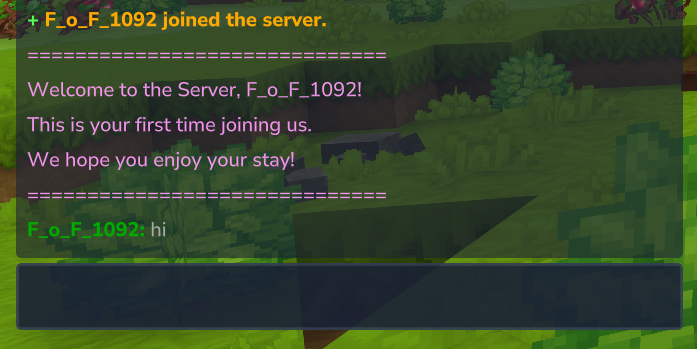
Basic Settings
enabled- Enable first join system (default: true)messages- Array of welcome messages shown on first join- Supports hex colors (e.g.,
<#ffffff>text</#ffffff>) - Supports gradients, rainbow effects, and all text formatting
- Use
{player}placeholder for player name - All PlaceholderAPI placeholders are supported
- Supports hex colors (e.g.,
broadcastToAll- Broadcast to all players instead of just the joining player (default: true)showMotdIfEnabled- Show MOTD message if enabled (default: true)
Kits (kits)
Array of kit names to give to the player on first join.
"kits": ["firstjoin", "starter"]- Kits are given with a 1 second delay to ensure inventory is ready
- Kit must exist in the
kits/directory - No error message is shown to the player if kit doesn't exist (logged to console)
Teleport on First Join (teleport)
enabled- Enable teleportation to a warp on first join (default: false)warpName- Name of the warp to teleport to (default: "firstjoin")
Command Execution
Execute commands when a player joins for the first time.
Run as Server (runAsServer):
- Commands executed with server/console permissions
- Supports
{player}and all PlaceholderAPI placeholders - Executed with a 1.5 second delay
"runAsServer": [
"/broadcast <gold>{player}</gold> joined for the first time!",
"/eco give {player} 1000"
]
Run as Player (runAsPlayer):
- Commands executed as if the player typed them
- Player's permissions apply
- Supports
{player}and all PlaceholderAPI placeholders - Executed with a 1.5 second delay
"runAsPlayer": [
"/rules"
]
Join/Quit Messages (joinandquit)
enabled- Enable join/quit messages (default: true)joinMessage- Message format when player joins- Use
{player}placeholder for player name
- Use
quitMessage- Message format when player quits- Use
{player}placeholder for player name
- Use
Chat Format (chat)
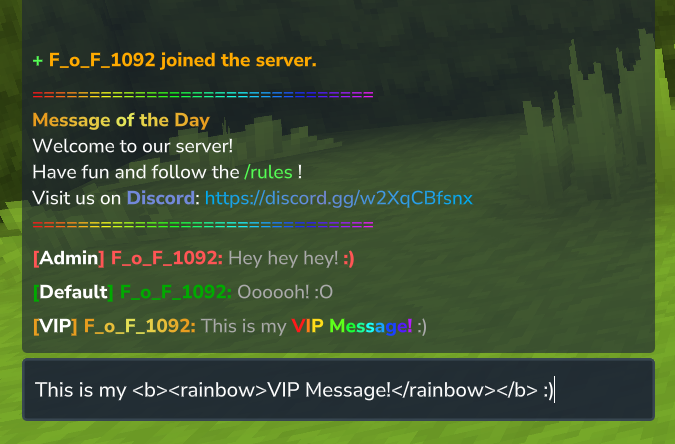
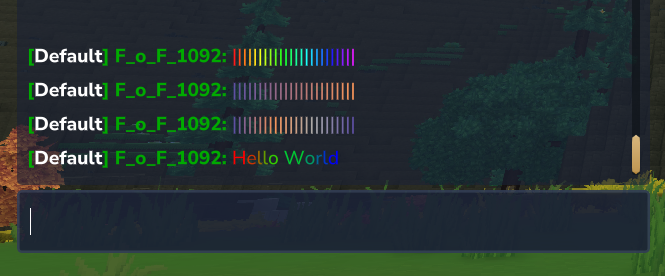
enabled- Enable custom chat formatting (default: true)ignoreChatCancellations- Process chat messages even if cancelled by other plugins (default: true)- When enabled, EssentialsPlus will always apply chat formatting, regardless of other plugins cancelling the chat event
syncWithGroupSystem- Automatically synchronize chat groups with GroupSystem configuration (default: true for new installations, false for updates)- When enabled, chat groups are synced with GroupSystem on server start and reload:
- New groups from GroupSystem are automatically added with generated chat formats
- Groups not in GroupSystem are removed from chat configuration
- Existing chat formats are never modified - only new groups get default formats
- Generated format for new groups:
{prefix}<bold>[{GroupName}] {player}: </bold>{suffix}<#AAAAAA>{message}</#AAAAAA> - Important for existing servers: This is automatically set to
falsewhen updating to preserve your existing chat configurations - Synchronization timing: Runs after LuckPerms sync (if enabled) on server start and
/essentialsplus reload
- When enabled, chat groups are synced with GroupSystem on server start and reload:
groups- Map of permission groups to chat formats- Basic placeholders:
{player}(player name),{message}(chat message),{group}(permission group) - World & Location:
{world}(world name),{x},{y},{z}(coordinates) - Player info:
{uuid}(player UUID),{language}(player language) - Time & Date:
{time}(HH:mm:ss),{date}(yyyy-MM-dd) - Supports hex colors
- Basic placeholders:
Group Synchronization Workflow
When both syncWithLuckPerms and syncWithGroupSystem are enabled:
- LuckPerms Sync - GroupSystem groups are synced with LuckPerms (new groups added, priorities updated)
- Chat Group Sync - Chat groups are synced with the updated GroupSystem
- Result - Your chat configuration automatically stays in sync with your permission system
This ensures consistency across your server's group structure without manual configuration updates.
Private Messages (msg)

senderFormat- Message format for sender- Use
{sender}placeholder for sender name - Use
{receiver}placeholder for receiver name - Use
{message}placeholder for message content
- Use
receiverFormat- Message format for receiver- Use
{sender}placeholder for sender name - Use
{receiver}placeholder for receiver name - Use
{message}placeholder for message content
- Use
Both
{sender}and{receiver}are available in both formats, so each line can reference either participant.
Ignore System (ignore)
enabled- Enable/disable ignore system (default: true)silentModeDefault- Default silent mode for new ignores (default: false)duration- Ignore duration settingsdefault- Default ignore duration (default: "1d")maximum- Maximum ignore duration (default: "30d")
blockedInteractions- What interactions should be blockedchat- Block chat messages (default: true)messages- Block private messages (default: true)mail- Block mail (default: true)tpa- Block TPA requests (default: true)
Homes System (homes)
limitsEnabled- Enable home limits per permission group (default: false)
Note: Warmup, cooldown, and prices for home commands are configured in the commandInterceptions section.
Kits System (kits)
hideKitsWithoutPermission- Controls visibility of kits in/kitand/kitlistGUI when a player lacksessentialsplus.kit.<kit>permission (default: true)true: Kits without permission are hidden completelyfalse: Kits stay visible but claim button is disabled
Warps System (warps)
hideWarpsWithoutPermission- Controls visibility of warps in/warpsGUI when a player lacksessentialsplus.warp.<warp>permission (default: true)true: Warps without permission are hidden completelyfalse: Warps stay visible but teleport button is disabled
Near Command (near)
radius- Search radius in blocks (default: 50.0)showDistance- Show distance to nearby players (default: true)
MOTD (motd)
enabled- Enable /motd command (default: true)messages- Array of messages shown with/motdcommand- Supports hex colors
- Use
{player}placeholder for player name
Group System (groupSystem)
syncWithLuckPerms- Automatically synchronize groups with LuckPerms on server start and reload (default: true)- When enabled, groups are synced with LuckPerms:
- New LuckPerms groups are automatically added
- Groups not in LuckPerms are removed
- Priority is always synced from LuckPerms weight
- Prefix/suffix/tag are only set when group is first created
- When enabled, groups are synced with LuckPerms:
fallbackGroup- Default group name to use when player has no group or group not found (default: "Default")groups- Array of group configurations
Group Configuration
Each group in the groups array has the following properties:
name- Group name (must match LuckPerms group name if using LuckPerms)priority- Priority value (higher = higher priority)prefix- Color/format applied before player name (e.g.,"<red>")suffix- Color/format applied after player name (e.g.,"</red>")tag- Optional tag displayed in chat (e.g.,"<red>[Admin]</red>")
Available placeholders in chat formats (chat.groups):
{player}- Player name{prefix}- Player's prefix from group{suffix}- Player's suffix from group{tag}- Player's tag from group{displayName}- Formatted player name: prefix + player + suffix{message}- Chat message content{group}- Player's group name
Example configuration:
"groupSystem": {
"syncWithLuckPerms": true,
"fallbackGroup": "Default",
"groups": [
{
"name": "Admin",
"priority": 100,
"prefix": "<red>",
"suffix": "</red>",
"tag": "<red>[Admin]</red>"
},
{
"name": "VIP",
"priority": 50,
"prefix": "<#e89d1f>",
"suffix": "</#e89d1f>",
"tag": "<#e89d1f>[VIP]</#e89d1f>"
},
{
"name": "Default",
"priority": 0,
"prefix": "<green>",
"suffix": "</green>",
"tag": ""
}
]
}
Example chat format using new placeholders:
  "chat": {
"enabled": true,
"ignoreChatCancellations": true,
"syncWithGroupSystem": true,
"groups": {
"adventure": "<#00AA00><bold>[<#FFFFFF>Player</#FFFFFF>] {player}: </bold></#00AA00><#AAAAAA>{message}</#AAAAAA>",
"op": "<#FF5555><bold>[<#FFFFFF>OP</#FFFFFF>] {player}: </bold></#FF5555><#AAAAAA>{message}</#AAAAAA>",
"default": "<#00AA00><bold>[<#FFFFFF>Default</#FFFFFF>] {player}: </bold></#00AA00><#AAAAAA>{message}</#AAAAAA>",
"moderator": "<#5555FF><bold>[<#FFFFFF>Moderator</#FFFFFF>] {player}<#FF5555>: </bold></#5555FF><#AAAAAA>{message}</#AAAAAA>",
"admin": "<#FF5555><bold>[<#FFFFFF>Admin</#FFFFFF>] {player}: </bold></#FF5555><#AAAAAA>{message}</#AAAAAA>",
"vip": "<#e89d1f><bold>[<#FFFFFF>VIP</#FFFFFF>] <gradient:#e89d1f:#e4e95d:#e89d1f>{player}</gradient>: </bold></#e89d1f><#AAAAAA>{message}</#AAAAAA>"
}
},
Random Teleport (rtp)
useWorldSpawnAsCenter- Use the selected world's spawn as RTP center (default: true)- If enabled, RTP is always calculated around the world spawn
- If disabled, RTP is calculated around the target player's current position
maxRadius- Maximum distance in blocks from the selected RTP center (default: 500)minRadius- Minimum distance in blocks from the selected RTP center (default: 100)maxChecks- Maximum number of attempts to find a safe location (default: 10)enabledWorlds- List of worlds where RTP is permitted- Use
["*"]to allow all worlds (default) - Use
["world", "world_nether"]to allow specific worlds - Empty list allows all worlds
- Use
defaultWorld- Fallback world configuration when current world is not enabledenabled- Enable automatic fallback to default world (default: true)name- Name of the default world to use for fallback (default: "default")
Note: Warmup, cooldown, and prices for the RTP command are configured in the commandInterceptions section.
Example configuration:
  "rtp": {
"useWorldSpawnAsCenter": true,
"maxRadius": 500,
"minRadius": 100,
"maxChecks": 10,
"enabledWorlds": [
"*"
],
"defaultWorld": {
"enabled": true,
"name": "default"
}
},
Broadcast System (broadcast)
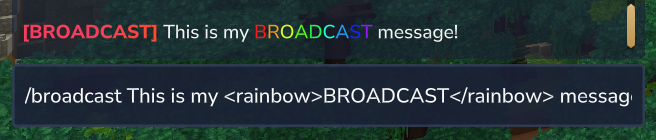
format- Prefix format for broadcast messages- Supports hex colors and gradients
- Example:
<bold><gradient:#e89d1f:#e4e95d:#e89d1f>[EssentialsPlus]</gradient></bold>
Spawn System (spawn)
spawnCommandOrder- Ordered fallback list for/spawncommand teleports (default:GROUP, MAIN, WORLD)joinTeleportOrder- Ordered fallback list for real server joins (default:FIRSTJOIN, DEFAULT)deathTeleportOrder- Ordered fallback list for death teleports (default:DEFAULT)worldOverrides- Optional per-world order overridesworldName- World name the override applies toorder- Ordered fallback list for that world (applies to/spawn, join teleport, and death teleport)
inheritedGroupSpawns- When true, group spawn resolution uses highest configured group priority instead of primary group (default: true)autoCreateWorldSpawns- When true (default), world spawns are automatically persisted from the Hytale default spawn provider the first time a world needs one. Set tofalseto disable this auto-creation entirely — useful when you want full manual control over all spawn entries.
Order modes:
GROUP- Use group spawn (if configured for the player)FIRSTJOIN- Use the configured first-join spawn (useful in join-focused strategies)MAIN- Use main spawnWORLD- Use world spawn of the relevant worldDEFAULT- Do not force an EssentialsPlus spawn; handoff to default Hytale behavior
How the order is selected:
/spawnand/spawn <player>usespawnCommandOrder- Real joins use
joinTeleportOrder - Death/respawn flow uses
deathTeleportOrder - If a
worldOverridesentry matches the current world, itsorderreplaces the global order for that world - The resolver checks entries from left to right and uses the first available target
Small examples:
spawnCommandOrder = ["GROUP", "MAIN", "WORLD"]
- Player has no group spawn
- Main spawn exists
- Result:
/spawnteleports to MAIN (second entry), becauseGROUPwas not available
joinTeleportOrder = ["FIRSTJOIN", "DEFAULT"]
- A player joins for the first time and no first-join spawn is set
- Result: EssentialsPlus does not force a spawn and hands off to Hytale default behavior via
DEFAULT
Note: Warmup, cooldown, and prices for spawn/teleportation commands are configured in the commandInterceptions section.
Multi-Server Settings (serverNetworkSettings)
serverName- Human-readable server label (default:"server-1")serverUuid- Persistent technical server identity used for homes, warps, and spawns in multi-server setups- Must be a valid UUID
- If missing or invalid, EssentialsPlus generates a new random UUID automatically
Discord Integration (discord)
link- Discord server invite link (default: "https://discord.gg/yourserver")
Protection System (protections)
enabled- Enable/disable protection system (default: true)spawn- Spawn protection settingsenabled- Enable/disable spawn protection (default: true)radius- Protection radius in blocks from spawn point (default: 0)- Players cannot break or place blocks within this radius
- Set to 0 to disable protection
pvp- Allow PvP in spawn protection area (default: false)- Bypass permission:
essentialsplus.protection.bypass
Mail System (mail)
limit- Mail limit settingsenabled- Enable mail limit per player (default: true)count- Maximum number of mails a player can have (default: 50)
spamProtection- Spam protection settingsenabled- Enable spam protection (default: true)cooldownSeconds- Cooldown in seconds between sending mails (default: 60)similarityCheck- Similarity check settingsenabled- Enable similarity check to prevent duplicate mails (default: true)threshold- Similarity threshold (0.0-1.0, higher = stricter) (default: 0.8)
Economy System (economy)
enabled- Enable/disable economy system (default: true)startBalance- Starting balance for new players (default: 0.0)minBalance- Minimum allowed balance (default: 0.0)maxBalance- Maximum allowed balance (default: 100000000.0)transactionLogging- Enable transaction logging (default: true)currencySymbol- Currency symbol (default: "$")currencyNameSingular- Singular currency name (default: "Dollar")currencyNamePlural- Plural currency name (default: "Dollars")
Features:
- Complete economy system with transaction logging
- Configurable currency names and symbols
- Balance limits to prevent exploits
- Built-in Economy API for other plugins
- Player-to-player money transfers
Related Commands:
/money- View your balance/money <player>- View another player's balance/money send <player> <amount>- Send money/money top- View richest players/pay <player> <amount>- Quick payment
Ignore System (ignore)
enabled- Enable/disable ignore system (default: true)silentModeDefault- Default silent mode for new ignores (default: false)duration- Ignore duration settingsdefault- Default ignore duration (default: "1d")maximum- Maximum ignore duration (default: "30d")
blockedInteractions- What interactions should be blockedchat- Block chat messages (default: true)messages- Block private messages (default: true)mail- Block mail (default: true)tpa- Block TPA requests (default: true)
Custom Commands System (customCommands)
The Custom Commands system allows server administrators to create custom commands without modifying the plugin code.
commands- Array of custom command definitions
Command Definition Properties:
Each command in the commands array supports:
command- Command name with/(e.g., "/lobby", "/help") (required)description- Brief description of the command (optional)aliases- Array of alternative command names (optional)runAsServer- Array of commands executed as console/server (optional)runAsPlayer- Array of commands executed as the player (optional)messages- Array of messages sent to the sender (optional)
Console Execution:
Custom commands can be executed by both players and the console. When run from the console there is no player context, so:
runAsServercommands andmessagesstill run.runAsPlayercommands are skipped (a warning is logged), because they require a player.- Only custom placeholders are resolved; player-specific placeholders (e.g.
{player},{x}) stay empty.
Design console-usable custom commands around runAsServer (and pass the target explicitly), rather than relying on runAsPlayer.
Available Placeholders:
{player}- Player name{uuid}- Player UUID{world}- Current world name{x},{y},{z}- Player coordinates{language}- Player language{time}- Current time (HH:mm:ss){date}- Current date (yyyy-MM-dd)- All PlaceholderAPI placeholders (if PlaceholderAPI is installed)
Example Custom Commands:
  "customCommands": {
"commands": [
{
"command": "/lobby",
"description": "Teleport to the server lobby",
"aliases": [
"/hub"
],
"runAsServer": [],
"runAsPlayer": [
"/warp spawn"
],
"messages": [
"<gradient:#00acf2:#7289DA>Teleporting to lobby...</gradient>"
]
},
{
"command": "/gmc",
"description": "Set your gamemode to creative",
"aliases": [],
"runAsServer": [],
"runAsPlayer": [
"/gamemode creative"
],
"messages": []
},
{
"command": "/bonus",
"description": "Claim your daily bonus",
"aliases": [],
"runAsServer": [
"/kit bonus {player}",
"/eco give {player} 25",
"/broadcast <gold>{player}</gold> <white>has bonus the daily bonus! <yellow>/bonus</yellow></white>"
],
"runAsPlayer": [],
"messages": [
"<gray>You received your bonus reward!</gray>"
]
}
]
}
Security Notes:
- Commands in
runAsServerexecute with full server privileges - Test custom commands thoroughly before production use
- Use permissions to restrict access to powerful commands
Permissions:
- Each custom command automatically gets:
essentialsplus.customcommands.<name> - Example: A command named "lobby" requires
essentialsplus.customcommands.lobby
Command Interception System (commandInterceptions)
Universal warmup, cooldown, and price system for any command.
Command Interception allows you to add warmup times, cooldowns, and prices to any command (including EssentialsPlus commands and commands from other plugins) without modifying code.
Configuration Format:
  "commandInterceptions": {
"commands": [
{
"command": "/home",
"price": 0.0,
"cooldown": "0s",
"warmup": "0s",
"warmupMovementAllowed": true
},
{
"command": "/warp",
"price": 0.0,
"cooldown": "0s",
"warmup": "0s",
"warmupMovementAllowed": true
}
]
}
Interception Properties:
command- Command name to intercept (with or without/) (required)price- Cost in economy currency to use command (default: 0.0)cooldown- Time between command uses (e.g., "30s", "5m", "1h") (default: "0s")warmup- Delay before command execution (e.g., "5s", "10s") (default: "0s")warmupMovementAllowed- Allow movement during warmup (default: true)
Time Format:
Supports multiple time units:
s- Seconds (e.g., "30s")m- Minutes (e.g., "5m")h- Hours (e.g., "1h")d- Days (e.g., "7d")- Combinations: "1h30m", "2d12h"
Features:
- Works with any command (EssentialsPlus or external plugins)
- Automatic alias detection (e.g.,
/ehomematches/home) - Movement detection during warmup (cancels teleport if player moves)
- Per-player cooldown tracking
- Economy integration for command prices
Example Use Cases:
Prevent Teleport Spam:
{
  "command": "/warp",
  "cooldown": "30s",
  "warmup": "5s",
  "warmupMovementAllowed": false
}
Premium Command with Price:
{
  "command": "/jumpto",
  "price": 50.0,
  "cooldown": "10s",
  "warmup": "2s",
  "warmupMovementAllowed": true
}
Instant Command with Cooldown:
{
  "command": "/kit",
  "cooldown": "1h",
  "warmup": "0s",
  "warmupMovementAllowed": true
}
Permissions:
Interception reductions are available through permissions:
essentialsplus.interception.<command>.warmup.<percentage>- Reduce warmup timeessentialsplus.interception.<command>.cooldown.<percentage>- Reduce cooldown timeessentialsplus.interception.<command>.price.<percentage>- Reduce price- Add
.infinitesuffix to bypass completely (e.g.,essentialsplus.interception.home.cooldown.infinite)
Example - Nickname Command Interception:
{
  "command": "/nick",
  "price": 100.0,
  "cooldown": "1h",
  "warmup": "0s",
  "warmupMovementAllowed": true
}
This would charge 100 currency and require a 1-hour cooldown between nickname changes. VIP players could get reduced costs:
essentialsplus.interception.nick.price.50- 50% off (costs 50 currency)essentialsplus.interception.nick.cooldown.infinite- No cooldown at all
Disabled Commands (disabledCommands)
Disable specific EssentialsPlus commands without editing code.
The disabledCommands array allows you to disable individual EssentialsPlus commands that you don't want available on your server.
How it works:
- Add command names (without
/) to the array - Commands will not be registered when the plugin starts
- Aliases are also disabled automatically
- Does NOT affect commands from other plugins
Example - Disable Creative-Mode Commands:
  "disabledCommands": [
"/fly",
"/god",
"/more",
"/repair"
]
Notes:
- Use command names exactly as they appear in Commands Documentation
- Changes require server restart to take effect
- Disabled commands will not appear in tab completion
Common use cases:
- Disable commands that conflict with other plugins
- Remove commands that don't fit your server's gameplay
- Disable admin commands on public servers
- Simplify command list for players
AFK System (afk)
The AFK (Away From Keyboard) system automatically marks players as inactive and optionally kicks them.
Server Restart Required
If you change enabled from false to true, a server restart is required.
enabled- Enable/disable the AFK system (default: true)autoAFKTime- Time of inactivity before auto-marking as AFK (e.g., "10m") (default: "10m")broadcast- Broadcast AFK status changes to all players (default: true)enableAutoAFKPermissionBypass- Allow permission-based bypass for auto-AFK (default: false)kick- Auto-kick configurationenabled- Enable automatic kick for AFK players (default: false)autoKickTime- Time in AFK status before kick (e.g., "30m") (default: "30m")
Features:
- Automatic AFK detection based on player inactivity
- Optional broadcast of AFK status changes
- Optional auto-kick for AFK players
- Permission bypass for auto-AFK and auto-kick
- Integration with
/list, TPA, and messaging systems
Nickname System (nickname)
Allows players to set custom display names with full color and formatting support.
enabled- Enable/disable nickname system (default: true)maxLength- Maximum nickname length in plain text, excluding color codes (default: 16)minLength- Minimum nickname length in plain text (default: 3)preventDuplicates- Prevent multiple players from using the same nickname (default: true)blacklistedWords- List of words that cannot be used in nicknames (default: empty array)prefix- Prefix automatically added before all nicknames (default: "")suffix- Suffix automatically added after all nicknames (default: "")
Example Configuration:
"nickname": {
"enabled": true,
"maxLength": 16,
"minLength": 3,
"preventDuplicates": true,
"blacklistedWords": [],
"prefix": "",
"suffix": ""
}
Features:
- Full color and formatting support (same as chat -
<red>,<#RRGGBB>,<gradient:...>,<rainbow>, etc.) - Nicknames appear in chat, player list, and all placeholder-based messages
- Automatically prevents impersonating real player names
- Conflict resolution when real players join (removes conflicting nicknames)
- Integrates with PlaceholderAPI through
{player},{realname},{nickname}placeholders
Related Commands: /nick, /nick reset, /realname
Sleep Percentage (sleep)
The sleep percentage system allows the night to be skipped when a configurable percentage of players are sleeping, instead of requiring all players.
enabled- Enable/disable the sleep percentage system (default: false)sleepPercentage- Percentage of online players that must be sleeping to skip the night (default: 75)
How it works:
- When enough players are in bed, the world time automatically advances to morning
- Works across all worlds independently
Example configuration:
"sleep": {
"enabled": true,
"sleepPercentage": 50
}
WorldBorder Settings (worldBorder)
Global default settings for the world border system.
warningDistance- How many blocks from the border edge a player receives a proximity warning (default:50). Set to0to disable warnings globally for all newly created borders.
Example:
"worldBorder": {
"warningDistance": 50.0
}| Value | Effect |
|---|---|
50 | Players see a warning message when within 50 blocks of any border edge |
0 | Proximity warnings are disabled — players receive no advance notice |
100 | Earlier warnings, useful for fast-moving players or large servers |