📖 Commands
Command Overview
| Command | Description | Permission | Aliases |
|---|---|---|---|
/spawn | Teleports to spawn | essentialsplus.spawn.self | /espawn |
/spawn main | Teleport directly to main spawn | essentialsplus.spawn.self | /espawn main |
/spawn main [Player] | Teleport another player to main spawn | essentialsplus.spawn.other | /espawn main [Player] |
/spawn [Player] | Teleport another player to spawn | essentialsplus.spawn.other | /espawn [Player] |
/spawn all | Teleport all players to spawn | essentialsplus.spawn.all | /espawn all |
/spawn world [World] | Teleport to current or named world spawn | essentialsplus.spawn.world.self | /espawn world [World] |
/spawn world [World] [Player] | Teleport another player to a specific world spawn | essentialsplus.spawn.world.other | /espawn world [World] [Player] |
/spawn list | Show all configured spawn targets | essentialsplus.spawn.list | /espawn list |
/spawn firstjoin | Teleport to the first-join spawn | essentialsplus.spawn.firstjoin.self | /espawn firstjoin |
/spawn group [Group] | Teleport to your own group's spawn | essentialsplus.spawn.group.self | /espawn group |
/setspawn | Sets the main spawn point | essentialsplus.setspawn | /esetspawn |
/setspawn main | Sets the main spawn point | essentialsplus.setspawn | /esetspawn main |
/setspawn world | Sets world spawn for current world | essentialsplus.setspawn | /esetspawn world |
/setspawn firstjoin | Sets spawn for first-time joins | essentialsplus.setspawn | /esetspawn firstjoin |
/setspawn group [Group] | Sets spawn for a specific group | essentialsplus.setspawn | /esetspawn group [Group] |
/delspawn | Deletes the main spawn | essentialsplus.delspawn | /edelspawn |
/delspawn main | Deletes the main spawn | essentialsplus.delspawn | /edelspawn main |
/delspawn world [World] | Deletes a world spawn | essentialsplus.delspawn | /edelspawn world [World] |
/delspawn firstjoin | Deletes the firstjoin spawn | essentialsplus.delspawn | /edelspawn firstjoin |
/delspawn group [Group] | Deletes a group spawn | essentialsplus.delspawn | /edelspawn group [Group] |
/sethome [Name] | Sets a home location | essentialsplus.sethome | /ecreatehome, /esethome |
/home [Name] | Teleports to a home | essentialsplus.home.self | /ehome |
/home player [Player] [Name] | Teleports to another player's home | essentialsplus.home.other | /ehome player [Player] [Name] |
/homes | Lists all your homes | essentialsplus.homes | /ehomes |
/delhome [Name] | Deletes a home | essentialsplus.delhome | /remhome, /rmhome, /edelhome, /eremhome, /ermhome |
/setwarp [Name] | Creates a warp point | essentialsplus.setwarp | /esetwarp |
/warp [Name] | Teleports to a warp | essentialsplus.warp | /ewarp |
/warps | Lists all warps | essentialsplus.warps | /ewarps |
/delwarp [Name] | Deletes a warp | essentialsplus.delwarp | /remwarp, /rmwarp, /edelwarp, /eremwarp, /ermwarp |
/kitcreate [Name] [Cooldown|onetime] | Creates a kit | essentialsplus.kitcreate | /ekitcreate |
/kit [Name] | Claims a kit | essentialsplus.kit.self | /ekit [Name] |
/kit [Player] [Name] | Give a kit to another player | essentialsplus.kit.other | /ekit [Player] [Name] |
/kit all [Name] | Give a kit to all players | essentialsplus.kit.all | /ekit all [Name] |
/kitlist | Lists all kits | essentialsplus.kitlist | /kits, /ekitlist, /ekits |
/kitdelete [Name] | Deletes a kit | essentialsplus.kitdelete | /ekitdelete |
/msg [Player] [Message] | Sends a private message | essentialsplus.msg | /w, /m, /t, /pm, /tell, /whisper, /emsg |
/r [Message] | Replies to last message | essentialsplus.msg | /reply, /er |
/list | Shows all online players | essentialsplus.list | /online, /playerlist, /plist, /who, /elist |
/rules | Displays server rules | essentialsplus.rules | /erules |
/tpa [Player] | Requests teleport to player | essentialsplus.tpa | /teleportask, /tpask, /etpa |
/tpahere [Player] | Requests player to teleport to you | essentialsplus.tpahere | /etpahere |
/tpaaccept | Accepts teleport request | essentialsplus.tpaaccept | /tpaccept, /tpyes, /tpayes, /etpaaccept |
/tpadeny | Denies teleport request | essentialsplus.tpadeny | /tpdeny, /tpno, /tpano, /etpadeny |
/tpahereall | Requests all players to teleport | essentialsplus.tpahereall | /etpahereall |
/mute [Player] [Time] --reason="..." | Mutes a player | essentialsplus.mute | /silence, /emute |
/unmute [Player] | Unmutes a player | essentialsplus.mute | /eunmute |
/kick [Player] --reason="..." | Kicks a player from the server | essentialsplus.kick.other | /ekick |
/kick all --reason="..." --world="..." | Kicks all players from the server | essentialsplus.kick.all | /ekick all |
/tempban [Player] [Time] --reason="..." | Temporarily bans a player | essentialsplus.tempban | /etempban |
/untempban [Player] | Unbans a player | essentialsplus.tempban | /euntempban |
/ipban [Player] --reason="..." | Permanently bans player's IP | essentialsplus.ipban | /eipban, /banip |
/unipban [IP or Player] | Removes an IP ban | essentialsplus.ipban | /eunipban, /unbanip, /pardonip |
/god | Toggles god mode | essentialsplus.god.self | /godmode, /egod |
/god [Player] | Toggle god mode for another player | essentialsplus.god.other | /godmode [Player], /egod [Player] |
/heal | Restores health | essentialsplus.heal.self | /eheal |
/heal [Player] | Heal another player | essentialsplus.heal.other | /eheal [Player] |
/heal all | Heal all players | essentialsplus.heal.all | /eheal all |
/nick [Nickname] | Set your nickname | essentialsplus.nick.self | /enick |
/nick [Player] [Nickname] | Set another player's nickname | essentialsplus.nick.other | /enick [Player] [Nickname] |
/nick reset | Remove your nickname | essentialsplus.nick.self | /enick reset |
/nick reset [Player] | Remove another player's nickname | essentialsplus.nick.other | /enick reset [Player] |
/realname | Show your own real name | essentialsplus.realname | /realn, /rname, /erealname |
/realname [Nickname] | Reveal who hides behind a nickname | essentialsplus.realname.lookup | /realn [Nickname], /rname [Nickname], /erealname [Nickname] |
/freecam | Toggles free camera | essentialsplus.freecam.self | /efreecam |
/freecam [Player] | Toggle freecam for another player | essentialsplus.freecam.other | /efreecam [Player] |
/moonwalk | Toggles moonwalk mode | essentialsplus.moonwalk.self | /emoonwalk |
/moonwalk [Player] | Toggle moonwalk for another player | essentialsplus.moonwalk.other | /emoonwalk [Player] |
/adminchat [Message] | Sends admin message | essentialsplus.adminchat | /a, /eadminchat, /ea |
/broadcast [Message] | Broadcasts message | essentialsplus.broadcast | /bc, /alert, /bcast, /ebroadcast |
/top | Teleports to highest block | essentialsplus.top.self | /etop |
/top [Player] | Teleport another player to top | essentialsplus.top.other | /etop [Player] |
/bottom | Teleports to lowest safe block | essentialsplus.bottom.self | /ebottom |
/bottom [Player] | Teleport another player to bottom | essentialsplus.bottom.other | /ebottom [Player] |
/whois [Player] | Shows player information | essentialsplus.whois | /ewhois |
/playtime | Shows your playtime | essentialsplus.playtime.self | /eplaytime, /pt |
/playtime [Player] | Shows another player's playtime | essentialsplus.playtime.other | /eplaytime [Player], /pt [Player] |
/playtime top [Amount] | Shows top players by playtime | essentialsplus.playtime.top | /eplaytime top [Amount], /pt top [Amount] |
/ipinfo [player|ip] | Shows IP history and search | essentialsplus.ipinfo | /eipinfo |
/seen [Player] | Shows last seen time | essentialsplus.seen | /eseen |
/clearchat | Clears the chat | essentialsplus.clearchat.self | /cc, /eclearchat |
/clearchat [Player] | Clear chat for another player | essentialsplus.clearchat.other | /cc [Player], /eclearchat [Player] |
/clearchat all | Clear chat for all players | essentialsplus.clearchat.all | /cc all, /eclearchat all |
/clearinventory | Clears inventory | essentialsplus.clearinventory.self | /ci, /eclearinventory |
/clearinventory [Player] | Clear another player's inventory | essentialsplus.clearinventory.other | /ci [Player], /eclearinventory [Player] |
/disposal | Open disposal GUI to delete items | essentialsplus.disposal | /edisposal, /trash |
/near | Shows nearby players | essentialsplus.near | /nearby, /enear |
/motd | Shows Message of the Day | essentialsplus.motd | /emotd |
/back | Returns to previous location | essentialsplus.back.self | /return, /eback |
/back home | Return to last home location | essentialsplus.back.self.home | - |
/back death | Return to death location | essentialsplus.back.self.death | - |
/back spawn | Return to last spawn location | essentialsplus.back.self.spawn | - |
/back warp | Return to last warp location | essentialsplus.back.self.warp | - |
/back tpa | Return to last TPA location | essentialsplus.back.self.tpa | - |
/back teleport | Return to last generic teleport | essentialsplus.back.self.teleport | - |
/back list | List all saved locations | essentialsplus.back.list | - |
/back [Player] | Teleport another player back | essentialsplus.back.other | - |
/jumpto | Teleports to target block | essentialsplus.jumpto | /jump, /j, /ejumpto, /ej |
/thru | Teleports through walls | essentialsplus.thru.self | /through, /ethru |
/fly | Toggles fly mode | essentialsplus.fly.self | /efly |
/fly [Player] | Toggle fly mode for another player | essentialsplus.fly.other | /efly [Player] |
/flyspeed [speed] | Set your fly speed (0.0–15.0) | essentialsplus.flyspeed.self | /eflyspeed, /fspeed |
/flyspeed [speed] [player] | Set another player's fly speed | essentialsplus.flyspeed.other | /eflyspeed [speed] [player] |
/flyspeed reset | Reset your fly speed to default | essentialsplus.flyspeed.self | /eflyspeed reset |
/more | Set held item to max stack size | essentialsplus.more | /emore |
/more [Player] | Set another player's item to max | essentialsplus.more.other | /emore [Player] |
/repair | Repairs item in hand | essentialsplus.repair.self | /fix, /erepair, /efix |
/repair [Player] | Repair another player's item | essentialsplus.repair.other | /erepair [Player] |
/repair all | Repairs all items | essentialsplus.repair.self.all | /erepair all |
/repair all [Player] | Repair all of another player's items | essentialsplus.repair.other.all | /erepair all [Player] |
/rtp [world] | Random teleport | essentialsplus.rtp | /randomtp, /wild, /ertp |
/rtp [player] [world] | Random teleport another player | essentialsplus.rtp.other | - |
/rtp --minRadius=X --maxRadius=Y | RTP with custom radius | essentialsplus.rtp.customRadius | - |
/discord | Shows Discord invite link | essentialsplus.discord | /ediscord |
/vanish | Toggle vanish mode | essentialsplus.vanish.self | /evanish, /v |
/vanish [Player] | Toggle vanish for another player | essentialsplus.vanish.other | /evanish [Player], /v [Player] |
/freeze | Toggle freeze mode | essentialsplus.freeze.self | /efreeze |
/freeze [Player] | Toggle freeze for another player | essentialsplus.freeze.other | /efreeze [Player] |
/freeze all | Freeze all players | essentialsplus.freeze.all | /efreeze all |
/ignore [Player] | Ignore a player | essentialsplus.ignore.self | /eignore |
/ignore list | View your ignore list | essentialsplus.ignore.list.self | /eignore list |
/ignore list [Player] | View another player's ignore list | essentialsplus.ignore.list.others | /eignore list [Player] |
/ignore remove [Player] | Remove player from ignore list | essentialsplus.ignore.self | /eignore remove [Player] |
/ignore clear | Clear your entire ignore list | essentialsplus.ignore.self | /eignore clear |
/money | View your balance | essentialsplus.money.view.self | /balance, /bal, /emoney, /eco, /wallet |
/money [Player] | View another player's balance | essentialsplus.money.view.others | As above |
/money send [Player] [Amount] | Send money to another player | essentialsplus.money.send | As above |
/money set [Player] [Amount] | Set a player's balance | essentialsplus.money.set | As above |
/money add [Player] [Amount] | Add money to a player's balance | essentialsplus.money.add | As above |
/money remove [Player] [Amount] | Remove money from a player | essentialsplus.money.remove | As above |
/money top [Page] | View top richest players | essentialsplus.money.top | As above |
/pay [Player] [Amount] | Send money to another player | essentialsplus.money.send | /epay |
/adminshop | Open the admin shop UI | essentialsplus.adminshop.use | /ashop |
/adminshop add | Add item to shop | essentialsplus.adminshop.admin.add | As above |
/adminshop remove | Remove item from shop | essentialsplus.adminshop.admin.remove | As above |
/adminshop list [Page] | List all shop items | essentialsplus.adminshop.admin.list | As above |
/adminshop buy [item] [--amount] | Buy items from shop | essentialsplus.adminshop.buy | As above |
/adminshop sell [--amount] | Sell item in hand | essentialsplus.adminshop.sell | As above |
/adminshop sellall | Sell all sellable items | essentialsplus.adminshop.sellall | As above |
/announce | Shows announcement usage | essentialsplus.announce | /announcements, /bc, /announcement, /announcer |
/announce send [id] [player] | Send specific announcement manually | essentialsplus.announce.send.all | /eannounce send [id] [player] |
/announce add [name] [message] | Create new announcement | essentialsplus.announce.add | /eannounce add [name] [message] |
/announce remove [name] | Remove existing announcement | essentialsplus.announce.remove | /eannounce remove [name], /announce delete [name] |
/announce list [page] | List all announcements | essentialsplus.announce.list | /eannounce list [page], /announce ls |
/announce reload | Reload announcement system | essentialsplus.announce.reload | /eannounce reload |
/announce toggle | Toggle announcement system | essentialsplus.announce.toggle | /eannounce toggle |
/mail | Open mailbox and view inbox | essentialsplus.mail | /email, /m |
/mail send [player] [message] | Send mail to another player | essentialsplus.mail.send | As above |
/mail sendall [message] | Send mail to all players | essentialsplus.mail.sendall | As above |
/mail read [number] | Read a specific mail | essentialsplus.mail | As above |
/mail list [--page] [--filter] | List mails with filters | essentialsplus.mail | As above |
/mail delete [number|all] | Delete specific mail or all mails | essentialsplus.mail.delete | As above |
/mail clear | Clear all mails from inbox | essentialsplus.mail.clear | As above |
/mail reply [number] [message] | Reply to a mail | essentialsplus.mail.send | As above |
/afk | Toggle AFK status | essentialsplus.afk.self | /eafk |
/afk [Player] | Toggle AFK status for another player | essentialsplus.afk.other | /eafk [Player] |
/worldborder create square [minX] [minZ] [maxX] [maxZ] | Create a square world border | essentialsplus.worldborder.create | /wb create square ..., /border create square ... |
/worldborder create round [radius] | Create a round world border at your location | essentialsplus.worldborder.create | /wb create round ..., /border create round ... |
/worldborder remove | Remove world border from current world | essentialsplus.worldborder.remove | /wb remove, /border remove |
/worldborder info | Display world border information | essentialsplus.worldborder.info | /wb info, /border info |
/worldborder list | List all world borders | essentialsplus.worldborder.list | /wb list, /border list |
/worldborder fill | Pre-generate chunks within border (preview + warning) | essentialsplus.worldborder.fill | /wb fill, /border fill |
/worldborder fill confirm | Start chunk pre-generation | essentialsplus.worldborder.fill | /wb fill confirm, /border fill confirm |
/worldborder fill cancel | Cancel ongoing fill operation | essentialsplus.worldborder.fill | /wb fill cancel, /border fill cancel |
/worldborder trim | Preview chunks outside border for deletion | essentialsplus.worldborder.trim | /wb trim, /border trim |
/worldborder trim confirm | Delete all chunks outside border | essentialsplus.worldborder.trim | /wb trim confirm, /border trim confirm |
/worldborder trim cancel | Cancel ongoing trim operation | essentialsplus.worldborder.trim | /wb trim cancel, /border trim cancel |
/essentialsplus | Displays plugin information | None | /essentials, /ess, /essp, /eess, /essversion |
/essentialsplus reload | Reloads plugin configuration | essentialsplus.reload | As above |
/essentialsplus migrate [Mod] [Merge] | Migrate data from other mods | essentialsplus.migrate | As above |
Home System
The home system allows players to set and manage personal teleportation points.
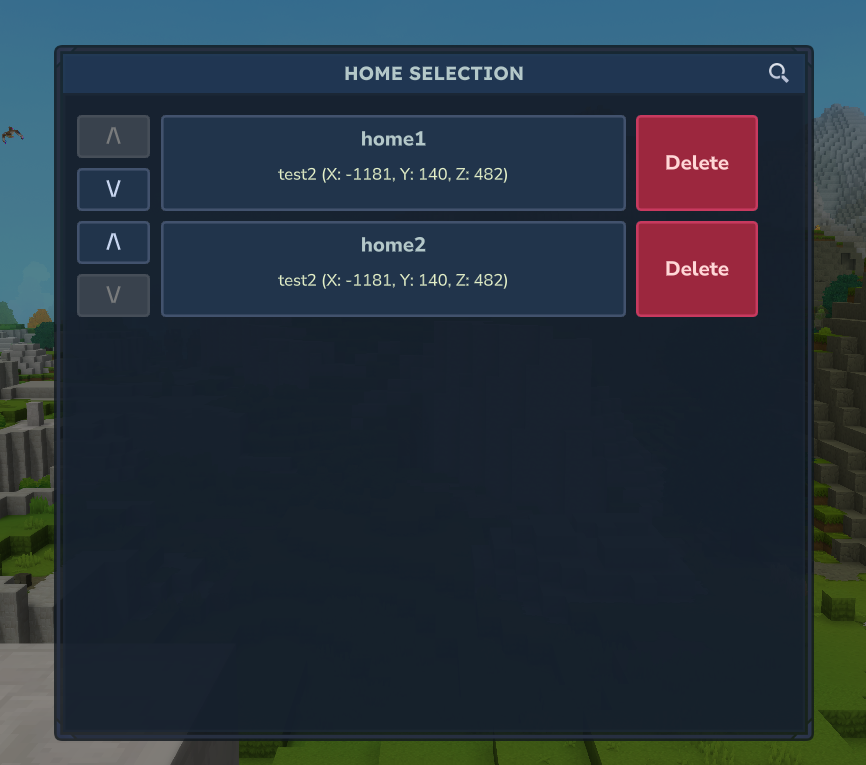
/sethome [Name]
Description: Sets a home at your current position
Aliases: /ecreatehome
Permission: essentialsplus.sethome
Parameters:
[Name](Optional) - Name of the home. Default:default
Usage:
/sethome            # Sets home named "default"
/sethome base       # Sets home named "base"
/sethome farm       # Sets home named "farm"
Notes:
- Saves position, rotation and world
- If a home with the same name already exists, an error message is displayed
- Use
/delhometo delete an existing home before setting it again
/home [Name]
Description: Teleports you to a set home
Aliases: None
Permission: essentialsplus.home.self
Parameters:
[Name](Optional) - Name of the home. Default:default
Usage:
/home              # Teleports to "default" home
/home base         # Teleports to "base" home
/home farm         # Teleports to "farm" home
Subcommand: Other Player's Home
/home player [playername] [name] # Teleports to another player's homeNotes:
- Requires
essentialsplus.home.otherpermission - Allows teleporting to another player's homes
- Subject to same warmup/cooldown as regular homes
Error Messages:
- Home not found:
Home 'xyz' not found. - World not found:
The world for home 'xyz' could not be found.
/homes
Description: Shows a list of all your set homes
Aliases: None
Permission: essentialsplus.homes
Usage:
/homesOutput:
Your homes:
- default
- base
- farm
- shop
If no homes are set:
You have no homes set. Use /sethome [name] to create one./delhome [Name]
Description: Deletes a set home
Aliases: /remhome, /rmhome
Permission: essentialsplus.delhome
Parameters:
[Name](Optional) - Name of the home to delete. Default:default
Usage:
/delhome           # Deletes "default" home
/delhome base      # Deletes "base" home
Error Message:
- Home does not exist:
Home 'xyz' not found.
Warp System
The warp system allows administrators to create public teleportation points accessible to all players.
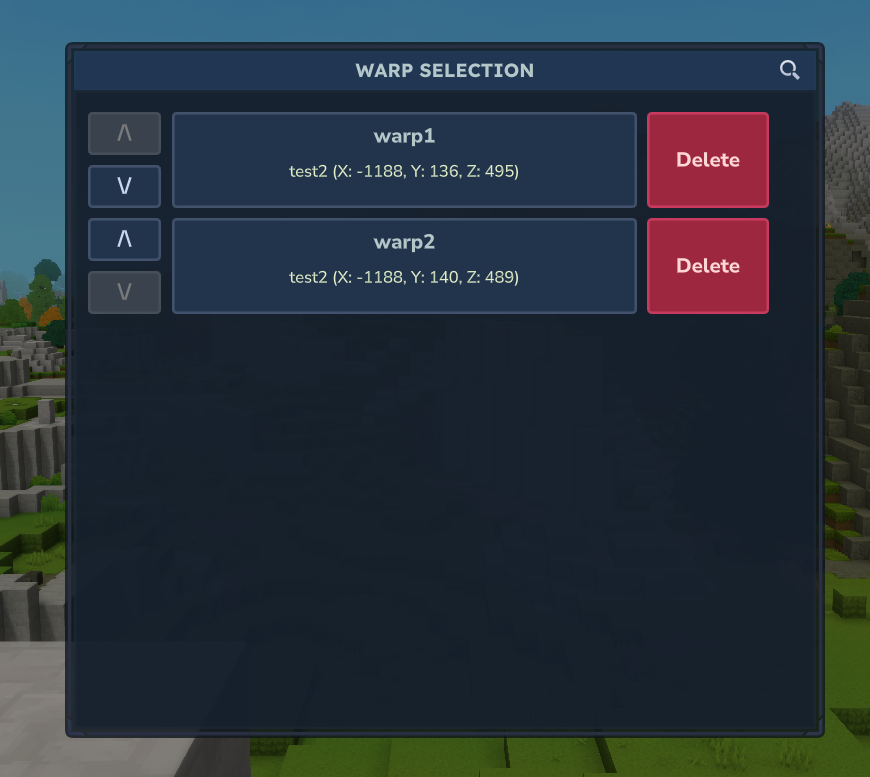
/setwarp [Name]
Description: Creates a warp at your current position
Aliases: None
Permission: essentialsplus.setwarp
Parameters:
[Name](Required) - Name of the warp
Usage:
/setwarp spawn       # Creates warp named "spawn"
/setwarp arena       # Creates warp named "arena"
/setwarp shop        # Creates warp named "shop"
Notes:
- Saves position, rotation and world
- If a warp with the same name already exists, an error message is displayed
- Use
/delwarpto delete an existing warp before setting it again
/warp [Name]
Description: Teleports you to a warp
Aliases: None
Permission: essentialsplus.warp AND essentialsplus.warp.[warpname] OR essentialsplus.warp.*
Parameters:
[Name](Required) - Name of the warp
Usage:
/warp spawn         # Teleports to "spawn" warp
/warp arena         # Teleports to "arena" warp
Features:
- Permission-based access: Each warp requires
essentialsplus.warp.[warpname]permission - Grant
essentialsplus.warp.*for access to all warps - Useful for VIP warps or restricted areas
Error Messages:
- Warp not found:
Warp 'xyz' not found. Use /warps to see all available warps. - No permission:
You don't have permission to use this kit. - World not found:
The world for warp 'xyz' could not be found.
/warps
Description: Opens the warp GUI and shows all available warps
Aliases: None
Permission: essentialsplus.warps
Usage:
/warpsGUI Features:
- Teleport button for each warp entry
- Delete button in GUI when you have
essentialsplus.delwarp - Order up/down buttons are visible for everyone
- Moving warps up/down requires
essentialsplus.warps.gui.order - Delete in GUI uses a two-click confirmation
If no warps exist:
No warps available. Use /setwarp [name] to create one./delwarp [Name]
Description: Deletes a warp
Aliases: /remwarp, /rmwarp
Permission: essentialsplus.delwarp
Parameters:
[Name](Required) - Name of the warp to delete
Usage:
/delwarp spawn # Deletes "spawn" warpError Message:
- Warp does not exist:
Warp 'xyz' not found.
Utility Commands
Helpful utility commands for players and administrators.
/top
Description: Teleport to the highest block at your current location
Aliases: /etop
Permission: essentialsplus.top.self
Usage:
/top                   # Teleport to surface
/etop                  # Using e-alias
Features:
- Finds the highest solid block at your X/Z coordinates
- Useful for escaping caves or returning to surface
- Safe teleportation (doesn't teleport into blocks)
Output:
Teleported to the highest block at your current position.
Error Messages:
- No safe position:
Could not find a safe position to teleport to.
/top [Player]
Description: Teleport another player to the highest block at their current location
Aliases: /etop [Player]
Permission: essentialsplus.top.other
Usage:
/top Player1           # Teleport Player1 to surface
/etop John             # Using e-alias
Features:
- Teleports target player to highest solid block at their X/Z coordinates
- Target player receives notification
- Safe teleportation (doesn't teleport into blocks)
Output:
- Sender:
Teleported Player1 to the highest block. - Target:
Teleported to the highest block at your current position.
Error Messages:
- Player not found:
That player could not be found. - No safe position:
Could not find a safe position to teleport to.
/bottom
Description: Teleport to the lowest safe block at your current location
Aliases: /ebottom
Permission: essentialsplus.bottom.self
Usage:
/bottom                # Teleport to lowest safe position
/ebottom               # Using e-alias
Features:
- Finds the lowest safe position at your X/Z coordinates
- Ensures solid ground and enough headroom
- Useful for descending quickly or finding cave systems
Output:
Teleported to the lowest safe position.
Error Messages:
- No safe position:
Could not find a safe position to teleport to.
/bottom [Player]
Description: Teleport another player to the lowest safe block at their current location
Aliases: /ebottom [Player]
Permission: essentialsplus.bottom.other
Usage:
/bottom Player1        # Teleport Player1 to lowest safe position
/ebottom John          # Using e-alias
Features:
- Teleports target player to lowest safe block at their X/Z coordinates
- Target player receives notification
- Safe teleportation with ground and headroom checks
Output:
- Sender:
Teleported Player1 to the lowest safe position. - Target:
Teleported to the lowest safe position.
Error Messages:
- Player not found:
That player could not be found. - No safe position:
Could not find a safe position to teleport to.
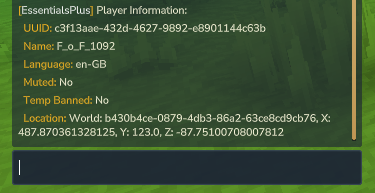
/whois [Player]
Description: Display detailed information about a player
Aliases: None
Permission: essentialsplus.whois
Parameters:
[Player](Required) - Name of the player
Usage:
/whois Player1         # Show info about Player1
/whois John            # Show info about John
Features:
- Shows player UUID
- Displays online status
- Shows join time
- Works from console
Output:
Player Information:
  UUID: 123e4567-e89b-12d3-a456-426614174000
  Name: Player1
  Status: Online
Error Messages:
- Player not found:
That player could not be found.
/playtime
Description: Display your total playtime and current session time
Aliases: /eplaytime, /pt
Permission: essentialsplus.playtime.self
Usage:
/playtime              # Show your playtime
/pt                    # Using alias
/eplaytime             # Using e-alias
Features:
- Shows total playtime across all sessions
- Displays current session playtime
- Time formatted in readable format (days, hours, minutes, seconds)
- Tracks playtime automatically
Output:
Your Playtime:
  Total Playtime: 5 days, 3 hours, 20 minutes
  Current Session: 1 hour, 45 minutes
/playtime [Player]
Description: Display another player's total playtime
Aliases: /eplaytime [Player], /pt [Player]
Permission: essentialsplus.playtime.other
Parameters:
[Player](Required) - Name of the player to check
Usage:
/playtime Player1           # Show Player1's playtime
/pt John                    # Show John's playtime using alias
Features:
- Works for both online and offline players
- Shows total playtime across all sessions
- Shows current session time if player is online
- Displays online/offline status
Output (Online Player):
Playtime for Player1:
  Total Playtime: 10 days, 5 hours
  Current Session: 2 hours, 15 minutes
  Status: Online
Output (Offline Player):
Playtime for Player1:
  Total Playtime: 10 days, 5 hours
  Status: Offline
Error Messages:
- Player not found:
No playtime data available for Player1.
/playtime top [Amount]
Description: Display the top players ranked by total playtime
Aliases: /eplaytime top [Amount], /pt top [Amount]
Permission: essentialsplus.playtime.top
Parameters:
[Amount](Optional) - Number of players to display (default: 10, max: 50)
Usage:
/playtime top              # Show top 10 players
/playtime top --amount=20  # Show top 20 players
/pt top --amount=50        # Show top 50 players (maximum)
Features:
- Displays top players ranked by total playtime
- Customizable number of players (1-50)
- Shows player names and formatted playtime
- Includes all players (online and offline)
Output:
Top 10 Players by Playtime:
  #1. Player1 - 15 days, 10 hours
  #2. Player2 - 12 days, 5 hours
  #3. Player3 - 10 days, 20 hours
  ...
Error Messages:
- No data available:
No playtime data available. - Amount exceeded:
Amount limited to maximum of 50 players.
/ipinfo [player|ip]
Description: Display IP address history and search for players by IP
Aliases: /eipinfo
Permission: essentialsplus.ipinfo
Parameters:
[player|ip](Required) - Player name or IP address to search for
Usage:
/ipinfo Player1              # Show IP history for Player1
/ipinfo 192.168.1.1          # Search for all players using this IP
/eipinfo John                # Show IP history for John
Features:
- Shows all IP addresses a player has used
- Shows all players who have used a specific IP
- Displays first and last seen times for each IP
- Useful for detecting alt accounts
- Works with both player names and IP addresses
- Persistent data across server restarts
Output for player search:
IP Information for Player1:
  Current IP: 192.168.1.100
  IP History:
    - 192.168.1.100 (First: 2026-01-15, Last: 2026-02-08)
    - 192.168.1.50 (First: 2026-01-10, Last: 2026-01-14)
Output for IP search:
Players using IP 192.168.1.100:
  - Player1 (Last seen: 2026-02-08 14:30)
  - Player2 (Last seen: 2026-02-07 10:15)
Error Messages:
- Player not found:
That player could not be found. - No IP data:
No IP data found for this player. - Invalid IP:
Invalid IP address format.
/seen [Player]
Description: Check when a player was last online
Aliases: /alts
Permission: essentialsplus.seen
Parameters:
[Player](Required) - Name of the player
Usage:
/seen Player1          # Check Player1's last seen
/seen OldFriend        # Check when OldFriend was last online
Features:
- Shows last login time
- Shows time since last seen
- Shows if player is currently online
- Stores player data across restarts
Output for online player:
Player1 is currently online.
First seen: 2026-01-15 14:30:22
Last seen: 2026-01-16 10:15:30
Output for offline player:
Player1 was last seen 2 hours ago.
First seen: 2026-01-15 14:30:22
Last seen: 2026-01-16 10:15:30
Error Messages:
- Player not found:
That player could not be found.
/clearchat
Description: Clear the chat for yourself
Aliases: /cc, /eclearchat
Permission: essentialsplus.clearchat.self
Usage:
/clearchat             # Clear your chat
/cc                    # Using alias
/eclearchat            # Using e-alias
Features:
- Sends blank lines to push old messages out of view for yourself
- Personal chat clearing
- Works from console
Output:
Your chat has been cleared.
/clearchat [Player]
Description: Clear the chat for another player
Aliases: /cc [Player], /eclearchat [Player]
Permission: essentialsplus.clearchat.other
Usage:
/clearchat Player1     # Clear Player1's chat
/cc John               # Using alias
/eclearchat Player2    # Using e-alias
Features:
- Clears chat for specific player
- Target player receives blank lines
- Useful for removing spam for specific players
Output:
- Sender:
Chat cleared for Player1. - Target:
Your chat has been cleared.
Error Messages:
- Player not found:
That player could not be found.
/clearchat all
Description: Clear the chat for all players
Aliases: /cc all, /eclearchat all
Permission: essentialsplus.clearchat.all
Usage:
/clearchat all         # Clear chat for everyone
/cc all                # Using alias
/eclearchat all        # Using e-alias
Features:
- Sends blank lines to all players
- Broadcasts confirmation message
- Works from console
Output:
Chat has been cleared for all players.
/clearinventory
Description: Clear your entire inventory
Aliases: /ci, /eclearinventory
Permission: essentialsplus.clearinventory.self
Usage:
/clearinventory        # Clear your inventory
/ci                    # Using alias
/eclearinventory       # Using alias
Features:
- Removes all items from inventory
- Instant effect
- Cannot be undone
Output:
Your inventory has been cleared.
/clearinventory [Player]
Description: Clear another player's inventory
Aliases: /ci [Player], /eclearinventory [Player]
Permission: essentialsplus.clearinventory.other
Usage:
/clearinventory Player1        # Clear Player1's inventory
/ci John                       # Clear John's inventory using alias
/eclearinventory Player2       # Using e-alias
Features:
- Clears all items from target player's inventory
- Target player receives notification
- Cannot be undone
Output:
- Sender:
Player1's inventory has been cleared. - Target:
Your inventory has been cleared by Admin.
/disposal
Description: Open a disposal GUI to quickly delete unwanted items
Aliases: /edisposal, /trash
Permission: essentialsplus.disposal
Usage:
/disposal              # Open disposal GUI
/trash                 # Using alias
/edisposal             # Using e-alias
Features:
- Opens a 54-slot container (double chest size)
- Items placed in the GUI are instantly deleted
- No confirmation required - deletion is immediate
- Automatically removes items as soon as they are placed
- Convenient for quick inventory cleanup
- Safe and efficient item disposal
Output:
- Opens disposal GUI silently
Notes:
- Items cannot be recovered once placed in the disposal GUI
- Container closes normally when done
- Perfect for removing unwanted items quickly without dropping them
/near
Description: Show nearby players within a configurable radius
Aliases: None
Permission: essentialsplus.near
Usage:
/near # Show nearby playersFeatures:
- Configurable search radius (default: 50 blocks)
- Shows distance to each player (optional, configurable)
- Sorted by distance (closest first)
- 2D distance calculation (horizontal)
Output:
Nearby players (2):
- Player1 (25 blocks)
- Player2 (48 blocks)
If no players nearby:
No players nearby within 50 blocks.
/motd
Description: Display the Message of the Day
Aliases: None
Permission: essentialsplus.motd
Usage:
/motd # Show the MOTDFeatures:
- Shows custom welcome message
- Configurable via config file
- Supports color codes and formatting
- Can include player name with
{player}placeholder
/afk
The AFK (Away From Keyboard) system allows players to mark themselves as inactive and automatically detects player inactivity.
Usage:
/afk- Toggle your AFK status manually/afk [Player]- Toggle another player's AFK status (requires permission)
Features:
- Manual AFK: Use
/afkto manually set yourself as AFK - Auto-AFK: System automatically marks players AFK after a configurable period of inactivity
- Auto-Kick: Players can be automatically kicked after being AFK for too long (configurable)
- Broadcast Notifications: Server-wide notifications when players go AFK or return (can be disabled)
- Integration: AFK status is shown in
/listcommand with[AFK]prefix - Do-Not-Disturb: AFK players cannot receive TPA requests or private messages
Bypass Permissions:
essentialsplus.afk.bypass.autoafktime- Player will not be automatically marked as AFKessentialsplus.afk.bypass.autokicktime- Player will not be kicked for being AFK too long
Configuration: See Configuration - AFK System for detailed setup options.
Examples:
/afk                  # Toggle your AFK status
/afk Steve            # Set Steve as AFK (admin only)
/back
Description: Advanced location history system with categorized teleportation
Aliases: /return, /eback
Base Permission: essentialsplus.back
Overview:
The /back command now features a comprehensive subcommand system that saves and categorizes your locations based on teleportation type. Each teleport action automatically saves your previous location in its appropriate category.
Location Categories:
- HOME - Saved when using
/homecommands - DEATH - Saved when you die
- SPAWN - Saved when using
/spawncommands - WORLD - Saved when changing worlds
- WARP - Saved when using
/warpcommands - TPA - Saved when accepting TPA requests
- TELEPORT - Saved for generic teleports (
/top,/bottom,/jumpto,/rtp) - BACK - Saved when using
/backitself
/back (Default)
Description: Return to your last teleportation location
Permission: essentialsplus.back.self
Usage:
/back                  # Teleport to most recent location
/return                # Using alias
/eback                 # Using e-alias
Features:
- Returns to the most recent teleportation location (any category)
- Automatically saves before any teleportation
- Supports warmup time and cooldown
- Optional movement restriction during warmup
/back home
Description: Return to the location before your last home teleport
Permission: essentialsplus.back.self.home
Usage:
/back home # Teleport to last location before using /homeWhen it's saved: Automatically saved when using /home, /home [name], or /home player [player] [name]
/back death
Description: Return to your death location
Permission: essentialsplus.back.self.death
Usage:
/back death # Teleport to where you diedWhen it's saved: Automatically saved when you die
/back spawn
Description: Return to the location before your last spawn teleport
Permission: essentialsplus.back.self.spawn
Usage:
/back spawn # Teleport to last location before using /spawnWhen it's saved: Automatically saved when using /spawn or /spawn [player]
/back warp
Description: Return to the location before your last warp
Permission: essentialsplus.back.self.warp
Usage:
/back warp # Teleport to last location before using /warpWhen it's saved: Automatically saved when using /warp [name]
/back tpa
Description: Return to the location before your last TPA teleport
Permission: essentialsplus.back.self.tpa
Usage:
/back tpa # Teleport to last location before accepting TPAWhen it's saved: Automatically saved when using /tpaaccept (both directions)
/back teleport
Description: Return to the location before your last generic teleport
Permission: essentialsplus.back.self.teleport
Usage:
/back teleport # Teleport to last location before /top, /bottom, /jumpto, or /rtpWhen it's saved: Automatically saved when using /top, /bottom, /jumpto, or /rtp commands
/back [Player]
Description: Teleport another player to their previous location
Permission: essentialsplus.back.other
Usage:
/back Player1    # Teleport Player1 to their last location
/back Steve      # Teleport Steve back
Features:
- Teleports target player to their LAST location (most recent)
- Target player receives notification
- Requires target to have a previous location saved
- Respects warmup and cooldown settings
*Back Command - Permissions System
Save Permissions (Controls which locations are saved):
essentialsplus.back.save.home- Allow saving HOME locationsessentialsplus.back.save.death- Allow saving DEATH locationsessentialsplus.back.save.spawn- Allow saving SPAWN locationsessentialsplus.back.save.warp- Allow saving WARP locationsessentialsplus.back.save.tpa- Allow saving TPA locationsessentialsplus.back.save.teleport- Allow saving TELEPORT locationsessentialsplus.back.save.world- Allow saving WORLD locationsessentialsplus.back.save.back- Allow saving BACK locations
Teleport Permissions (Controls which /back subcommands can be used):
essentialsplus.back.self- Use/back(default/last)essentialsplus.back.self.home- Use/back homeessentialsplus.back.self.death- Use/back deathessentialsplus.back.self.spawn- Use/back spawnessentialsplus.back.self.warp- Use/back warpessentialsplus.back.self.tpa- Use/back tpaessentialsplus.back.self.teleport- Use/back teleportessentialsplus.back.other- Use/back [player]
Permission Notes:
- Without save permission, the location will NOT be saved when teleporting
- Without teleport permission, you cannot use that specific subcommand
- The LAST category is always updated regardless of specific save permissions
- WORLD locations are automatically saved when changing worlds (if permission granted)
Back Command - Error Messages
Common Errors:
- No location saved:
You have no [type] location to return to. - Permission denied:
You don't have permission to use this command. - During cooldown:
You must wait {time} before using this command again. - Pending teleport:
You already have a pending teleport request. - Player not found:
That player could not be found. - Movement during warmup:
Teleportation cancelled due to movement.
/jumpto
Description: Teleport to the block you are looking at
Aliases: /jump, /j
Permission: essentialsplus.jumpto
Usage:
/jumpto                # Jump to the block you're looking at
/j                     # Short alias
Features:
- Maximum distance: 100 blocks
- Automatically finds safe landing position above target block
Output:
Teleported to the block you were looking at.
Error Messages:
- No block found:
No block found within 100 blocks. - No safe position:
Could not find a safe position to teleport to.
/thru
Description: Teleport through walls to the other side
Aliases: /through, /ethru
Permission: essentialsplus.thru
Usage:
/thru                  # Teleport through the wall you're looking at
/through               # Alternative alias
Features:
- Maximum distance: 100 blocks
- Detects walls and teleports to the air space on the other side
Output:
Teleported through the wall.
Error Messages:
- No wall found:
No wall found within 100 blocks to teleport through. - No safe position:
Could not find a safe position to teleport to.
/spawn
Description: Teleport to the world spawn point
Aliases: /espawn
Permission: essentialsplus.spawn.self
Usage:
/spawn                 # Teleport to spawn
/spawn Player1         # Teleport another player
/spawn main            # Teleport to main spawn
/spawn main Player1    # Teleport another player to main spawn
/spawn world           # Teleport using current world context
/spawn world default   # Teleport using world 'default' context
/spawn world Player1   # Teleport another player to their current world spawn
/spawn world default Player1  # Teleport another player using world 'default' context
Features:
- Per-world spawn configuration
- Uses spawn point set by
/setspawn - Preserves player rotation at spawn
Output:
Teleported to spawn.
Error Messages:
- No spawn set:
No spawn point has been set for this world. Use /setspawn to set one.
/setspawn
Description: Set the spawn point at your current location
Aliases: None
Permission: essentialsplus.setspawn
Usage:
/setspawn              # Set spawn at current location
/setspawn world        # Set world spawn for your current world
Features:
- Sets spawn for current world
- Saves position and rotation
- Persistent across server restarts
- Per-world configuration
Output:
Spawn point set at your current location for this world.
/list
Description: Shows a list of all online players on the server
Aliases: None
Permission: essentialsplus.list
Usage:
/listOutput:
Online (3) : Player1, Player2, Player3When no players are online:
No players online./rules
Description: Displays the configured server rules
Aliases: None
Permission: None (publicly available)
Usage:
/rulesOutput:
Server Rules:
1. [Rule 1]
2. [Rule 2]
3. [Rule 3]
Messaging System
The messaging system enables private conversations between players.

/msg [Player] [Message]
Description: Sends a private message to another player
Aliases: /w, /m, /t, /pm, /tell, /whisper
Permission: essentialsplus.msg
Parameters:
[Player](Required) - Name of the target player (case-insensitive, partial names work)[Message](Required) - The message to send
Usage:
/msg Player1 Hello, how are you?
/msg Play Short message    # Works with partial names
Features:
- Supports name search (exact match and partial names)
- Automatically creates a reply link for
/rcommand - Also works from console
Error Messages:
- Player not found:
That player could not be found. - No message provided:
Usage: /msg [name] [message]
/r [Message]
Description: Replies to the last received private message
Aliases: /reply
Permission: essentialsplus.msg (same as /msg)
Parameters:
[Message](Required) - The reply to send
Usage:
/r Thanks, I'm doing well!
/r OK
Features:
- Automatically remembers the last conversation partner
- Also works for messages from console
Error Messages:
- No conversation partner:
You have no one to reply to. - Player no longer online:
That player is no longer online. - No message provided:
Usage: /r [message]
/socialspy
Description: Toggle monitoring of private messages between players
Aliases: /sspy
Permission: essentialsplus.socialspy.self
Parameters: None
Usage:
/socialspy # Toggle SocialSpy on or offFeatures:
- Allows staff members to monitor all private messages (
/msg,/r) and mail (/mail send,/mail r) sent between players
Bypass Permission:
- Players with the permission
essentialsplus.socialspy.bypasswill never appear in SocialSpy logs - If either the sender or receiver has the bypass permission, the message is completely hidden from SocialSpy
Message Format:**
[SocialSpy] [MSG] PlayerA → PlayerB: Hello there!
[SocialSpy] [MAIL] PlayerC → PlayerD: Check out my build
Success Messages:
- Enabled:
SocialSpy enabled. You can now see private messages. - Disabled:
SocialSpy disabled. You can no longer see private messages.
Use Cases:
- Investigating rule violations
- General server moderation
Mail System
The mail system allows players to send and receive messages to each other, even when offline. All mails are stored persistently in individual player mailbox files.
/mail
Description: Open your mailbox and view your inbox
Aliases: /email, /m
Permission: essentialsplus.mail
Usage:
/mail                  # View inbox (first page)
/email                 # Using alias
/m                     # Using short alias
Features:
- Shows first 10 mails from inbox
- Displays mail ID, sender, subject, timestamp, and read status
- Unread mails are highlighted
- Shows total unread count
- Pagination support for large inboxes
Output:
=== Mail: Inbox (Page 1/3) === [3 unread]
[NEW] #5 From: Admin - Subject: "Welcome to the ser..." - 2 hours ago
[NEW] #4 From: Player2 - Subject: "Thanks for the hel..." - 5 hours ago
#3 From: Player3 - Subject: "Trade?" - 1 day ago
...
Use '/mail list --page=2' for more
/mail send [player] [message]
Description: Send mail to another player
Permission: essentialsplus.mail.send
Parameters:
[player](Required) - Username of the recipient[message](Required) - Message content
Usage:
/mail send Player1 Hello, how are you?
/mail send Admin Thanks for the help!
/mail send Bob Meet me at spawn in 10 minutes
Features:
- Recipient receives mail even when offline
- Real-time notification if recipient is online
- Spam protection with cooldown (30 seconds default)
- Text similarity detection prevents duplicate messages
- Auto-generated subject from first 20 characters
- Stored in both sender's and recipient's mailboxes
Output:
- Sender:
Mail sent to Player1! - Recipient (if online):
You received a new mail from YourName!
Error Messages:
- Player not found:
Player 'XYZ' not found. - Cannot send to self:
You cannot send mail to yourself. - Cooldown active:
Please wait 25 seconds before sending another mail. - Similar message:
You recently sent a similar message. Please wait before sending duplicates. - Inbox full:
The inbox of Player1 is full!
/mail sendall [message]
Description: Send mail to all players on the server (admin only)
Permission: essentialsplus.mail.sendall
Parameters:
[message](Required) - Message content
Usage:
/mail sendall Server maintenance in 30 minutes
/mail sendall New shop opened at spawn!
/mail sendall Vote for the server at example.com
Features:
- Sends mail to all players who have mailboxes
- Excludes sender from receiving the mail
- Asynchronous processing for large player counts
- Shows count of mails sent
Output:
- Processing:
Sending mail to all players... - Success:
Mail sent to 47 players!
/mail read [number]
Description: Read a specific mail by its ID
Permission: essentialsplus.mail
Parameters:
[number](Required) - Mail ID number (shown in list)
Usage:
/mail read 5           # Read mail #5
/mail read 1           # Read mail #1
Features:
- Shows full mail details
- Marks mail as read automatically
- Displays sender, timestamp, subject, and full message
- Shows if there are attachments (future feature)
Output:
=== Mail #5 === [EssentialsPlus-Mail] ============
From: Admin
To: You
Sent: 2 hours ago
Subject: Welcome to the server!

Welcome to the server! Enjoy your stay and follow the rules.
Visit /spawn to get started.

=== [EssentialsPlus-Mail] ========================
Error Messages:
- Mail not found:
Mail not found. - Invalid ID:
Invalid mail ID. Please provide a number.
/mail list [--page=X] [--filter=type]
Description: List your mails with optional filtering and pagination
Permission: essentialsplus.mail
Parameters:
--page=[number](Optional) - Page number (default: 1)--filter=[type](Optional) - Filter by type:unread,read, orsent
Usage:
/mail list                        # Show all inbox mails (page 1)
/mail list --page=2               # Show page 2 of inbox
/mail list --filter=unread        # Show only unread mails
/mail list --filter=read          # Show only read mails
/mail list --filter=sent          # Show sent mails
/mail list --filter=sent --page=2 # Combine filter and pagination
Features:
- 10 mails per page
- Color-coded unread/read status
- Shows mail count and page navigation
- Separate view for sent mails
- Real-time unread count display
Output:
=== Mail: Unread (Page 1/1) === [3 unread]
[NEW] #5 From: Admin - Subject: "Welcome..." - 2 hours ago
[NEW] #4 From: Player2 - Subject: "Thanks..." - 5 hours ago
[NEW] #3 From: Player3 - Subject: "Trade?" - 1 day ago
Error Messages:
- Empty mailbox:
Your mailbox is empty.
/mail delete [number|all]
Description: Delete a specific mail or all mails from inbox
Permission: essentialsplus.mail.delete
Parameters:
[number|all](Required) - Mail ID number orallto delete all
Usage:
/mail delete 5         # Delete mail #5
/mail delete 1         # Delete mail #1
/mail delete all       # Delete all mails from inbox
Features:
- Permanently removes mail from inbox
- Confirms deletion with message
alloption for bulk deletion- Cannot be undone
Output:
- Single:
Mail #5 deleted. - All:
Deleted 12 mails from your inbox.
Error Messages:
- Mail not found:
Mail not found. - Invalid ID:
Invalid mail ID. Please provide a number.
/mail clear
Description: Clear all mails from your inbox
Permission: essentialsplus.mail.clear
Usage:
/mail clear # Clear all mailsFeatures:
- Removes all mails from inbox at once
- Shows count of deleted mails
- Faster than
/mail delete all - Cannot be undone
Output:
- Success:
Cleared 15 mails from your inbox.
/mail reply [number] [message]
Description: Reply to a received mail
Permission: essentialsplus.mail.send
Parameters:
[number](Required) - Mail ID to reply to[message](Required) - Reply message content
Usage:
/mail reply 5 Thanks for the welcome!
/mail reply 3 Sure, let's trade at spawn
/mail reply 1 No problem, happy to help!
Features:
- Automatically addresses mail to the original sender
- Subject references original mail
- Marks original mail as read
- Subject to same spam protection as regular send
- Creates conversation thread
Output:
- Success:
Reply sent to Admin!
Error Messages:
- Mail not found:
Mail not found. - Cannot reply to sent mail:
You can only reply to received mails. - All standard
/mail senderror messages apply
Player Interaction Controls
These commands help manage player interactions, including blocking unwanted messages and teleport requests.
/ignore [Player]
Description: Ignore a player to block their chat messages, private messages, mail, and TPA requests
Aliases: /eignore
Permission: essentialsplus.ignore.self
Usage:
/ignore Steve
/ignore Alex --time=30d
/ignore Bob --silent=true
/ignore Charlie --time=7d --silent=false
Options:
--time=[duration]- Set how long to ignore the player (default: 1 day, max: 30 days configurable)- Examples:
1d,7d,30d,1h30m
- Examples:
--silent=[true|false]- Enable silent mode (requiresessentialsplus.ignore.silentmodepermission)- Silent mode: The ignored player won't know they are ignored
- Non-silent mode: The ignored player sees an error message when trying to contact you
- If not specified, uses the
silentModeDefaultsetting from config
Messages:
- Successfully ignored:
You are now ignoring {player} for {time}. - Silent mode:
You are now ignoring {player} for {time} (silent mode). - Already ignoring:
You are already ignoring {player}. - Cannot ignore self:
You cannot ignore yourself. - Cannot ignore player (bypass permission):
You cannot ignore {player}. - Duration too long:
Maximum ignore duration is {max}. - No permission for silent mode:
You don't have permission to use this command.
Notes:
- Players with
essentialsplus.ignore.bypasspermission cannot be ignored - Using the
--silentparameter requires theessentialsplus.ignore.silentmodepermission - Expired ignores are automatically cleaned up when you log in
- All ignore settings are saved to your player data file
/ignore list
Description: View your ignore list or another player's ignore list
Aliases: /eignore list
Permissions:
essentialsplus.ignore.list.self- View your own ignore listessentialsplus.ignore.list.others- View other players' ignore lists
Usage:
/ignore list
/ignore list Steve
Messages:
- Ignore list header:
=== Ignored Players (3) === - Entry format:
Steve - Since: 2024-01-15 14:30 | Expires in: 6 days 23 hours (Silent) - Empty list:
You are not ignoring anyone. - Other player's list:
=== Ignored Players by Steve (2) === - Other empty list:
Steve is not ignoring anyone.
/ignore remove [Player]
Description: Remove a player from your ignore list
Aliases: /eignore remove
Permission: essentialsplus.ignore.self
Usage:
/ignore remove Steve
/ignore remove Alex
Messages:
- Successfully removed:
You are no longer ignoring {player}. - Not ignoring:
You are not ignoring {player}.
/ignore clear
Description: Clear your entire ignore list
Aliases: /eignore clear
Permission: essentialsplus.ignore.self
Usage:
/ignore clearMessages:
- Successfully cleared:
Removed 3 player(s) from your ignore list. - Empty list:
You are not ignoring anyone.
Teleport System (TPA)
The teleport request system allows players to request teleportation to other players or request others to teleport to them.
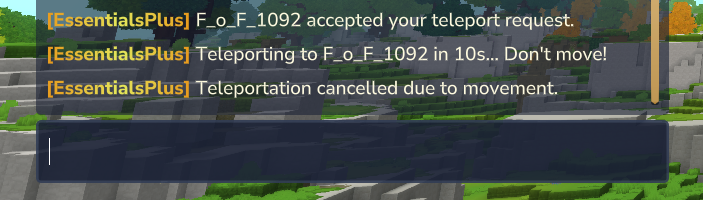
/tpa [Player]
Description: Request to teleport to another player
Aliases: /teleportask, /tpask
Permission: essentialsplus.tpa
Parameters:
[Player](Required) - Name of the target player
Usage:
/tpa Player1           # Request to teleport to Player1
/tpa John              # Request to teleport to John
Features:
- Target receives a request with accept/deny buttons
- Requests expire after a certain time
- Cannot send request to yourself
Error Messages:
- Player not found:
Player 'xyz' not found. - Self-teleport:
You cannot send a teleport request to yourself.
/tpahere [Player]
Description: Request another player to teleport to you
Aliases: None
Permission: essentialsplus.tpahere
Parameters:
[Player](Required) - Name of the target player
Usage:
/tpahere Player1       # Request Player1 to teleport to you
/tpahere Sarah         # Request Sarah to teleport to you
Features:
- Target receives a request with accept/deny buttons
- Useful for bringing players to your location
- Cannot send request to yourself
/tpaaccept
Description: Accept a pending teleport request
Aliases: /tpaccept, /tpyes, /tpayes
Permission: essentialsplus.tpaaccept
Usage:
/tpaaccept # Accept the last teleport requestFeatures:
- Automatically teleports the correct player based on request type
- Works for both
/tpaand/tpahererequests - Only accepts the most recent request
Error Messages:
- No pending request:
You have no pending teleport requests. - Requester offline:
The player who sent the request is no longer online.
/tpadeny
Description: Deny a pending teleport request
Aliases: /tpdeny, /tpno, /tpano
Permission: essentialsplus.tpadeny
Usage:
/tpadeny # Deny the last teleport requestFeatures:
- Notifies the requester that their request was denied
- Removes the pending request
Error Messages:
- No pending request:
You have no pending teleport requests.
/tpahereall
Description: Request all online players to teleport to you
Aliases: None
Permission: essentialsplus.tpahereall
Usage:
/tpahereall # Send teleport request to all playersFeatures:
- Sends individual requests to all online players
- Shows count of requests sent
- Each player can accept or deny individually
Kit System
The kit system allows administrators to create item kits that players can claim with configurable cooldowns and permission-based access.
/kitcreate [Name] [Cooldown]
Description: Creates a kit from your current inventory
Aliases: None
Permission: essentialsplus.kitcreate
Parameters:
[Name](Required) - Name of the kit[Cooldown](Required) - Cooldown time (e.g., "10m", "2h", "1d")
Usage:
/kitcreate starter 1h        # Creates "starter" kit with 1 hour cooldown
/kitcreate vip 30m           # Creates "vip" kit with 30 minute cooldown
/kitcreate daily 24h         # Creates "daily" kit with 24 hour cooldown
Notes:
- Saves all items from armor, hotbar, storage, utility, and backpack slots
- Time format: s (seconds), m (minutes), h (hours), d (days)
- Kit files are stored in
kits/[name].json - Each kit includes version information for compatibility
/kit [Name]
Description: Claims a kit
Aliases: /ekit
Permission: essentialsplus.kit.self AND essentialsplus.kit.[kitname]
Parameters:
[Name](Required) - Name of the kit
Usage:
/kit starter         # Claims "starter" kit
/kit vip             # Claims "vip" kit
/ekit daily          # Using e-alias
Features:
- Permission-based access: Each kit requires
essentialsplus.kit.[kitname]permission - Cooldown tracking per player using UUID
- Cooldown bypass: Grant
essentialsplus.kitbypas.[kitname]oressentialsplus.kitbypas.*to bypass cooldowns - Items are added to empty slots first, overflow goes to storage
- Automatically saves cooldown data after claiming
- GUI supports deleting kits with
essentialsplus.kitdelete(with confirmation) - GUI can hide kits without permission or show them as disabled via
kits.hideKitsWithoutPermission
Error Messages:
- Kit not found:
Kit 'xyz' not found. Use /kitlist to see all available kits. - No permission:
You don't have permission to use this kit. - Cooldown active:
You must wait [time] before claiming this kit again.
/kit [Player] [Name]
Description: Give a kit to another player
Aliases: /ekit [Player] [Name]
Permission: essentialsplus.kit.other
Parameters:
[Player](Required) - Name of the player[Name](Required) - Name of the kit
Usage:
/kit Player1 starter   # Give starter kit to Player1
/ekit John vip         # Using e-alias
Features:
- Give kits to other players
- Bypasses cooldown checks
- Target player receives notification
- Items added to target's inventory
Output:
- Sender:
Gave kit 'starter' to Player1. - Target:
You received the kit 'starter'.
Error Messages:
- Player not found:
That player could not be found. - Kit not found:
Kit 'xyz' not found.
/kit all [Name]
Description: Give a kit to all online players
Aliases: /ekit all [Name]
Permission: essentialsplus.kit.all
Parameters:
[Name](Required) - Name of the kit
Usage:
/kit all starter       # Give starter kit to all players
/ekit all event        # Using e-alias
Features:
- Gives kit to all online players simultaneously
- Bypasses cooldown checks
- All players receive notification
- Shows count of players who received the kit
Output:
- Sender:
Gave kit 'starter' to all online players. - Players:
You received the kit 'starter'.
Error Messages:
- Kit not found:
Kit 'xyz' not found.
/kitlist
Description: Lists all available kits
Aliases: /kits
Permission: essentialsplus.kitlist
Usage:
/kitlistOutput:
Available kits:
- starter (Cooldown: 1 hour)
- vip (Cooldown: 30 minutes)
- daily (Cooldown: 24 hours)
If no kits exist:
No kits available. Use /kitcreate [name] to create one./kitdelete [Name]
Description: Deletes a kit
Aliases: None
Permission: essentialsplus.kitdelete
Parameters:
[Name](Required) - Name of the kit to delete
Usage:
/kitdelete starter # Deletes "starter" kitNotes:
- Removes kit from memory and deletes the corresponding JSON file
- All cooldown data for this kit is also removed
Error Message:
- Kit does not exist:
Kit 'xyz' not found.
Economy System
The economy system provides a complete currency management solution with balances, transactions, and leaderboards.
/money
Description: View your current balance
Aliases: /balance, /bal, /emoney, /economy, /eco, /wallet
Permission: essentialsplus.money.view.self
Usage:
/money
/balance
/bal
Output:
Your balance: $1000.00/money [Player]
Description: View another player's balance
Aliases: /balance [Player], /bal [Player]
Permission: essentialsplus.money.view.others
Parameters:
[Player](Required) - Target player
Usage:
/money Steve
/balance Alex
Output:
Steve's balance: $5000.00/money send [Player] [Amount]
Description: Send money to another player
Aliases: None
Permission: essentialsplus.money.send
Parameters:
[Player](Required) - Target player[Amount](Required) - Amount to send
Usage:
/money send Steve 100
/money send Alex 250.50
Messages:
- Success:
You sent $100.00 to Steve. - Insufficient funds:
You don't have enough money.
/money set [Player] [Amount]
Description: Set a player's balance (admin command)
Aliases: None
Permission: essentialsplus.money.set
Parameters:
[Player](Required) - Target player[Amount](Required) - New balance amount
Usage:
/money set Steve 1000
/money set Alex 5000.50
Messages:
- Success:
Set Steve's balance to $1000.00.
/money add [Player] [Amount]
Description: Add money to a player's balance (admin command)
Aliases: None
Permission: essentialsplus.money.add
Parameters:
[Player](Required) - Target player[Amount](Required) - Amount to add
Usage:
/money add Steve 500
/money add Alex 100.50
Messages:
- Success:
Added $500.00 to Steve's balance.
/money remove [Player] [Amount]
Description: Remove money from a player's balance (admin command)
Aliases: None
Permission: essentialsplus.money.remove
Parameters:
[Player](Required) - Target player[Amount](Required) - Amount to remove
Usage:
/money remove Steve 200
/money remove Alex 50.50
Messages:
- Success:
Removed $200.00 from Steve's balance.
/money top [Page]
Description: View the richest players on the server
Aliases: None
Permission: essentialsplus.money.top
Parameters:
[Page](Optional) - Page number (default: 1)
Usage:
/money top
/money top 2
Output:
=== Top Balances (Page 1/2) ===
1. Steve: $10000.00
2. Alex: $8500.00
3. Notch: $7200.00
...
/pay [Player] [Amount]
Description: Send money to another player (shortcut for /money send)
Aliases: /epay
Permission: essentialsplus.money.send
Parameters:
[Player](Required) - Target player[Amount](Required) - Amount to send
Usage:
/pay Steve 100
/pay Alex 250.50
Messages:
- Success:
You sent $100.00 to Steve. - Insufficient funds:
You don't have enough money.
Admin Shop System
The admin shop system allows admins to create a server shop where players can buy and sell items for in-game currency. Items have configurable buy and sell prices, and all transactions are logged through the economy system.
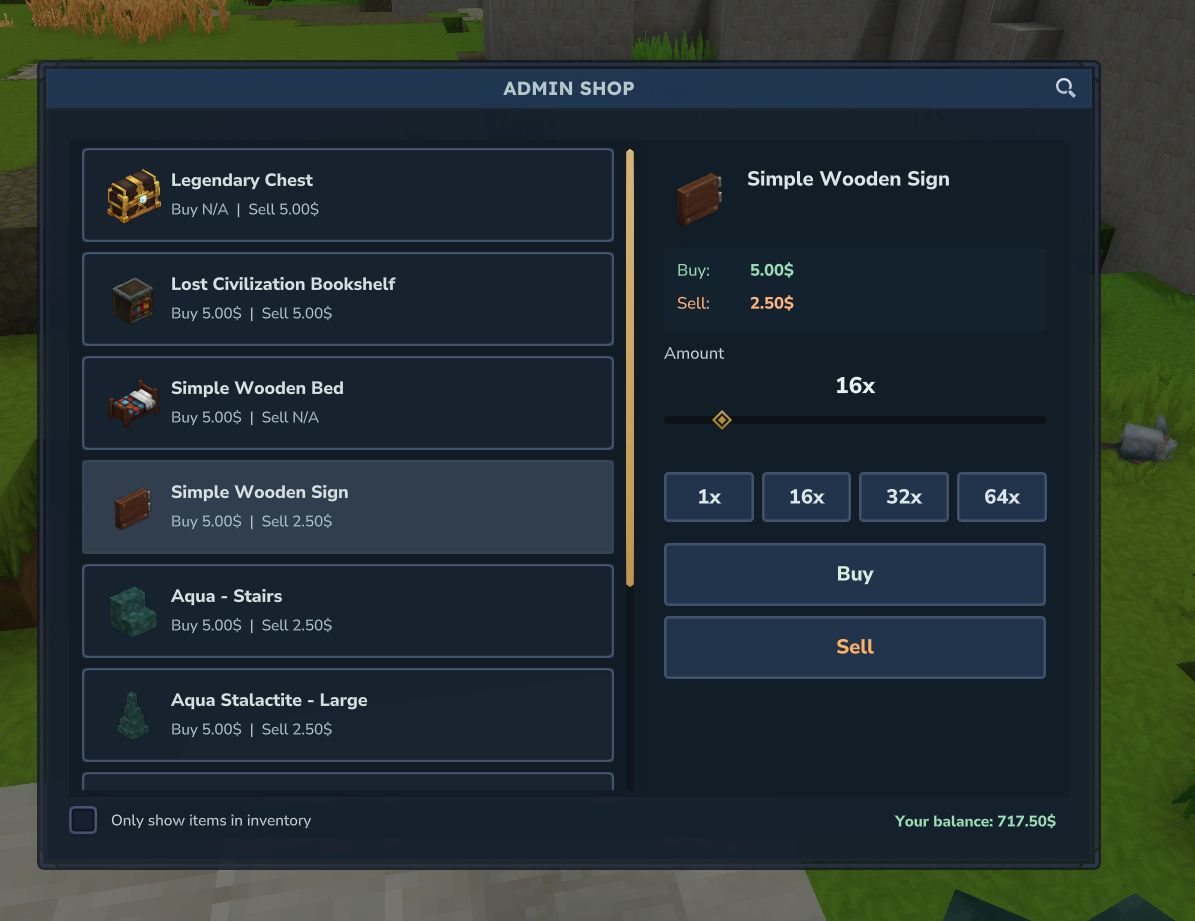
/adminshop
Description: Display admin shop help and available commands
Aliases: /ashop
Permission: essentialsplus.adminshop.use
Usage:
/adminshop
/ashop
Output:
=== Admin Shop Commands ===
/adminshop buy [item] --amount=1 - Buy items from shop
/adminshop sell --amount=[stack] - Sell item in hand
/adminshop sellall - Sell all sellable items
/adminshop list [page] - List all shop items

=== Admin Commands === (if you have permission)
/adminshop add --buyprice=X --sellprice=Y - Add item to shop
/adminshop remove - Remove item from shop
/adminshop add
Description: Add the item in your hand to the admin shop
Permission: essentialsplus.adminshop.admin.add
Parameters:
--buyprice=[amount](Optional) - Price for players to buy one item--sellprice=[amount](Optional) - Price players receive when selling one item--buyAndSellPrice=[amount](Optional) - Set both prices to the same value
Usage:
# Set both prices separately
/adminshop add --buyprice=100 --sellprice=50

# Set both prices to the same value
/adminshop add --buyAndSellPrice=100

# Only allow buying (not sellable)
/adminshop add --buyprice=100

# Only allow selling (not buyable)
/adminshop add --sellprice=50
Notes:
- You must hold the item you want to add in your hand
- At least one price must be specified
- Sell price cannot be higher than buy price (prevents exploits)
- If item already exists, it will be updated with new prices
Messages:
- Success:
Added Plant_Moss_Blue to shop (Buy: $100.00, Sell: $50.00) - Error:
Sell price cannot be higher than buy price. This would allow money exploits.
/adminshop remove
Description: Remove the item in your hand from the admin shop
Permission: essentialsplus.adminshop.admin.remove
Usage:
/adminshop removeNotes:
- You must hold the item you want to remove in your hand
- Item must exist in the shop
Messages:
- Success:
Removed Plant_Moss_Blue from shop - Error:
The item Plant_Moss_Blue is not in the shop.
/adminshop list [Page]
Description: List all items in the admin shop with their prices
Permission: essentialsplus.adminshop.admin.list
Parameters:
[Page](Optional) - Page number (default: 1, 10 items per page)
Usage:
/adminshop list
/adminshop list --page=2
Output:
=== Admin Shop Items (Page 1/3) === Total: 25
Plant_Moss_Blue - Buy: $100.00 | Sell: $50.00
Rock_Crystal_Green_Block - Buy: $500.00 | Sell: N/A
Ingredient_Tree_Sap - Buy: N/A | Sell: $10.00
...
Use /adminshop list --page=2 to see the next page.
/adminshop buy [item]
Description: Buy items from the admin shop
Permission: essentialsplus.adminshop.buy
Parameters:
[item](Required) - Item ID to buy (with autocomplete)--amount=[number](Optional) - Amount to buy (default: 1)
Usage:
# Buy 1 item
/adminshop buy Plant_Moss_Blue

# Buy 64 items
/adminshop buy Plant_Moss_Blue --amount=64

# Buy as many as possible until inventory is full
/adminshop buy Rock_Crystal_Green_Block --amount=999
Notes:
- Items are added to your inventory automatically
- If inventory is full, only buys what fits
- Money is deducted before items are given
- Supports item stacking (respects max stack size)
Messages:
- Success:
Bought 64x Plant_Moss_Blue for $6400.00. New balance: $3600.00 - Partial:
Only bought 32 of 64 items due to inventory space. - Error:
You need $6400.00 to complete this purchase. - Error:
Your inventory is full. Cannot buy items.
/adminshop sell
Description: Sell the item in your hand to the admin shop
Permission: essentialsplus.adminshop.sell
Parameters:
--amount=[number](Optional) - Amount to sell (default: entire stack)
Usage:
# Sell entire stack in hand
/adminshop sell

# Sell specific amount
/adminshop sell --amount=32
Notes:
- Sells item currently held in your hand
- Default behavior: sells entire stack
- Items are removed from inventory, money is added to balance
Messages:
- Success:
Sold 64x Plant_Moss_Blue for $3200.00. New balance: $8200.00 - Error:
The item Plant_Moss_Blue cannot be sold to the shop. - Error:
You only have 32 items but tried to sell 64.
/adminshop sellall
Description: Sell all sellable items in your inventory to the admin shop
Permission: essentialsplus.adminshop.sellall
Usage:
/adminshop sellallNotes:
- Scans entire inventory (hotbar + storage)
- Only sells items that are in the shop and marked as sellable
- Provides detailed breakdown of what was sold
- All items are removed, total earnings are added to balance
Output:
Sold 128 items (3 types) for $5600.00. New balance: $10600.00
Breakdown:
- 64x Plant_Moss_Blue: $3200.00
- 32x Ingredient_Tree_Sap: $320.00
- 16x Wood_Cedar_Trunk: $2080.00
Messages:
- Success: See output above
- Empty:
You don't have any sellable items in your inventory.
Moderation Commands
Powerful moderation tools for server administrators.
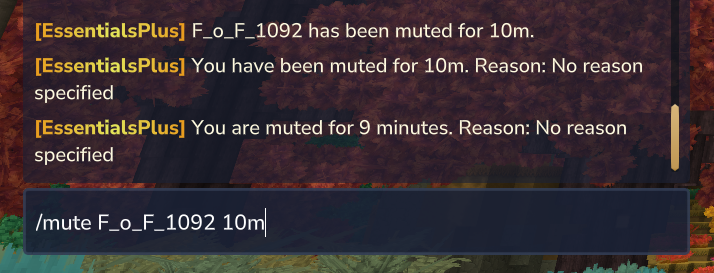
/mute [Player] [Time] --reason="..."
Description: Mute a player for a specified duration
Aliases: /silence
Permission: essentialsplus.mute
Parameters:
[Player](Required) - Name of the player to mute[Time](Required) - Duration (format: 10m, 2h, 1d, 7d)--reason="..."(Optional) - Reason for the mute
Usage:
/mute Player1 30m                              # Mute for 30 minutes (no reason)
/mute John 2h --reason="Spamming"              # Mute for 2 hours with reason
/mute BadPlayer 1d --reason="Inappropriate language"
Features:
- Prevents player from sending chat messages
- Automatic unmute after duration expires
- Mute persists across reconnects
- Reason is shown to the muted player
Time Formats:
m- Minutes (e.g., 10m, 30m)h- Hours (e.g., 1h, 5h)d- Days (e.g., 1d, 7d)
Error Messages:
- Player not found:
That player could not be found. - Invalid time format:
The time format is invalid... - Already muted:
That player is already muted.
/unmute [Player]
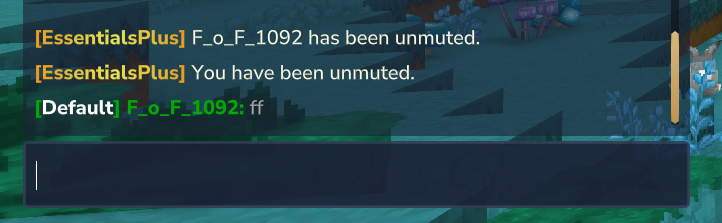
Description: Unmute a previously muted player
Aliases: None
Permission: essentialsplus.mute
Parameters:
[Player](Required) - Name of the player to unmute
Usage:
/unmute Player1        # Unmute Player1
/unmute John           # Unmute John
Error Messages:
- Player not found:
That player could not be found. - Not muted:
That player is not muted.
/kick [Player] --reason="..."
Description: Kick a player from the server. The player can reconnect immediately unless additional measures (like bans) are in place.
Permission: essentialsplus.kick.other, essentialsplus.kick.all, essentialsplus.kick.bypass
Parameters:**
[Player](Required) - Name of the player to kick, orallto kick multiple players--reason="..."(Optional) - Reason for the kick (visible to the kicked player and admins with notify permission)--world="worldname"(Optional, only withall) - Limits the kick to players in a specific world
Usage:
/kick Player1                                         # Kick Player1 with default reason
/kick Player1 --reason="Spamming chat"                # Kick Player1 with reason
/kick all --reason="Server restart in 5 minutes"      # Kick all players
/kick all --world="world_nether" --reason="Maintenance"  # Kick all players in the nether world
Features:
- Players with
essentialsplus.kick.bypasspermission cannot be kicked - Console can always use this command (bypasses cooldowns/warmup)
- All players receive broadcast messages when someone is kicked
- The command sender will not kick themselves when using
/kick all - Supports configurable warmup, cooldown, and price via command interception system
Error Messages:
- Player not found:
Could not find a player with the name {player}. - Bypass protection:
{player} has bypass permission and cannot be kicked. - World not found:
World {world} not found. - No permission:
You do not have permission to perform this action.
Broadcast Messages:
When a player is kicked, all players on the server will see:
- Single kick:
{player} has been kicked from the server. Reason: {reason} | Kicked by: {kickedby} - Mass kick:
{count} players have been kicked from the server. Reason: {reason} | Kicked by: {kickedby} - World kick:
{count} players have been kicked from world {world}. Reason: {reason} | Kicked by: {kickedby}
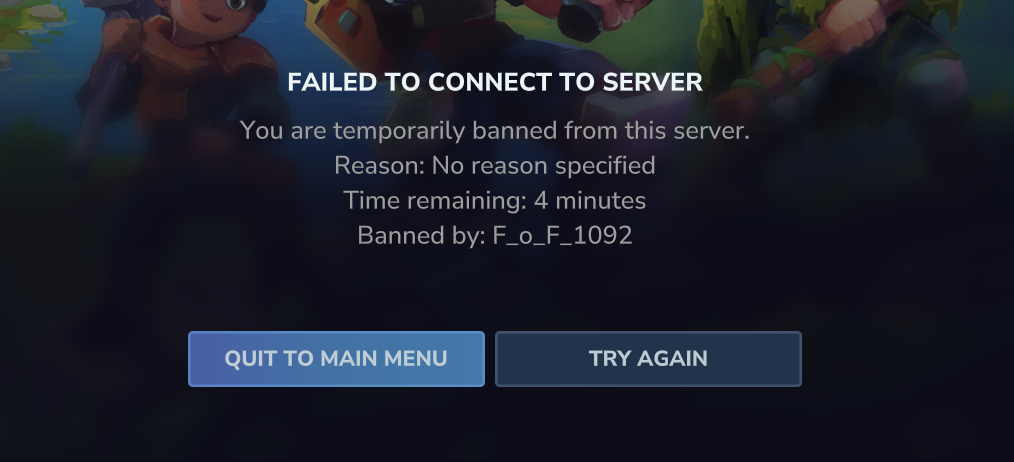
/tempban [Player] [Time] --reason="..."
Description: Temporarily ban a player from the server
Aliases: None
Permission: essentialsplus.tempban
Parameters:
[Player](Required) - Name of the player to ban[Time](Required) - Ban duration (format: 10m, 2h, 1d, 7d)--reason="..."(Optional) - Reason for the ban
Usage:
/tempban Player1 1d                              # Ban for 1 day (no reason)
/tempban Griefer 7d --reason="Griefing"          # Ban for 7 days with reason
/tempban Hacker 3d --reason="Using cheats"
Features:
- Prevents player from joining the server
- Automatic unban after duration expires
- Player is kicked immediately if online
- Ban reason shown on connection attempt
- Records who issued the ban
Time Formats:
m- Minutes (e.g., 10m, 30m)h- Hours (e.g., 1h, 5h)d- Days (e.g., 1d, 7d, 30d)
Error Messages:
- Player not found:
Player 'xyz' not found. - Invalid time format:
Invalid time format. Use format like: 10m, 2h, 1d, 7d, etc. - Already banned:
That player is already temp banned.
/untempban [Player]
Description: Unban a temporarily banned player
Aliases: None
Permission: essentialsplus.tempban
Parameters:
[Player](Required) - Name of the player to unban
Usage:
/untempban Player1     # Unban Player1
/untempban John        # Unban John
Features:
- Immediately removes the temporary ban
- Player can rejoin the server
Error Messages:
- Not banned:
That player is not temp banned.
/ipban [Player] --reason="..."
Description: Permanently ban a player's IP address
Aliases: /eipban, /banip
Permission: essentialsplus.ipban
Parameters:
[Player](Required) - Name of the player to IP ban--reason="..."(Optional) - Reason for the ban
Usage:
/ipban Hacker                                    # Ban without reason
/ipban Griefer --reason="Destroying spawn"       # Ban with reason
/ipban MultiAccount --reason="Alt account spam"
Features:
- Permanently bans the player's IP address
- Blocks all connections from that IP
- Stores ban information with timestamp and issuer
- Kicks the player immediately if online
- Shows ban details to blocked players
Stored Information:
- IP address
- Player UUID and username
- Ban reason
- Ban date/time
- Who issued the ban
Error Messages:
- IP already banned:
IP address {ip} is already banned. - Cannot get IP:
Could not determine player's IP address.
/unipban [IP or Player]
Description: Remove an IP ban by IP address or player name
Aliases: /eunipban, /unbanip, /pardonip
Permission: essentialsplus.ipban
Parameters:
[IP or Player](Required) - IP address (e.g., 192.168.1.100) or player name
Usage:
/unipban 192.168.1.100              # Unban by IP address
/unipban Player1                    # Unban by player name
/unipban Griefer                    # Find and unban player's IP
Features:
- Supports both IP address and player name input
- Automatically detects input type
- Finds associated IP when using player name
- Immediately allows reconnection from that IP
Error Messages:
- IP not banned:
IP address {ip} is not banned. - Player not banned:
Player {player} is not IP banned. - Player not found:
Could not find a player with the name {player}.
Admin Commands
Special commands for server administrators and staff.
/god
Description: Toggle god mode (invincibility)
Aliases: /godmode, /egod
Permission: essentialsplus.god.self
Usage:
/god                   # Toggle god mode
/godmode               # Using alias
/egod                  # Using e-alias
Features:
- Grants complete invulnerability when enabled
- No damage from any source
- Toggle on/off with the same command
Output:
- Enabled:
God mode enabled. - Disabled:
God mode disabled.
/god [Player]
Description: Toggle god mode for another player
Aliases: /godmode [Player], /egod [Player]
Permission: essentialsplus.god.other
Usage:
/god Player1           # Toggle god mode for Player1
/godmode John          # Using alias
/egod Player2          # Using e-alias
Features:
- Toggles invincibility for target player
- Target player receives notification
- Works on both online players
Output:
- Sender:
God mode enabled for Player1./God mode disabled for Player1. - Target:
God mode enabled./God mode disabled.
Error Messages:
- Player not found:
That player could not be found.
/heal
Description: Restore your health to maximum
Aliases: /eheal
Permission: essentialsplus.heal.self
Usage:
/heal                  # Heal to full health
/eheal                 # Using e-alias
Features:
- Instantly restores health to maximum
- Works in any situation
Output:
You have been healed to full health.
/heal [Player]
Description: Heal another player to maximum health
Aliases: /eheal [Player]
Permission: essentialsplus.heal.other
Usage:
/heal Player1          # Heal Player1
/eheal John            # Using e-alias
Features:
- Instantly restores target player's health to maximum
- Target player receives notification
Output:
- Sender:
Player1 has been healed to full health. - Target:
You have been healed to full health by Admin.
Error Messages:
- Player not found:
That player could not be found.
/heal all
Description: Heal all online players to maximum health
Aliases: /eheal all
Permission: essentialsplus.heal.all
Usage:
/heal all              # Heal all players
/eheal all             # Using e-alias
Features:
- Heals all online players simultaneously
- Each player receives notification
- Shows count of healed players
Output:
- Sender:
All players have been healed. - Players:
You have been healed to full health.
/nick [Nickname]
Description: Set your nickname with color and formatting codes
Aliases: /enick
Permission: essentialsplus.nick.self
Usage:
/nick CoolPlayer              # Set plain nickname
/nick [red]RedPlayer[/red]    # Set red nickname
/nick [gradient:#FF0000:#0000FF]GradientName[/gradient]  # Gradient effect
Features:
- Supports full color and formatting tags (see Chat Formatting Tutorial)
- Validates nickname length (configurable, default 3-16 characters)
- Prevents duplicate nicknames (if configured)
- Prevents impersonating real player names (if configured)
- Blacklist filtering (configurable)
- Your nickname appears in chat, /list, and all messages where {player} placeholder is used
- Configurable prefix/suffix for all nicknames
Output:
Your nickname has been set to [Nickname].
Error Messages:
- Nickname too short:
Nickname must be at least 3 characters long. - Nickname too long:
Nickname exceeds the maximum length of 16 characters. - Contains blacklisted word:
Nickname cannot contain blacklisted words. - Impersonates real player:
You cannot use a real player's name as your nickname. - Already taken:
This nickname is already in use by another player. - Feature disabled:
The nickname feature is currently disabled.
/nick [Player] [Nickname]
Description: Set another player's nickname
Aliases: /enick [Player] [Nickname]
Permission: essentialsplus.nick.other
Usage:
/nick John [gold]GoldenJohn[/gold]   # Set John's nickname
/nick Player1 AdminPlayer            # Set plain nickname for Player1
Features:
- Same validation rules as setting your own nickname
- Target player receives notification
- Useful for moderation or special events
Output:
- Sender:
Nickname for [Player] has been set to [Nickname]. - Target:
Your nickname has been set to [Nickname] by [Admin].
Error Messages:
- Player not found:
That player could not be found. - Same validation errors as
/nick [Nickname]
/nick reset
Description: Remove your nickname
Aliases: /enick reset
Permission: essentialsplus.nick.self
Usage:
/nick reset # Remove your nicknameOutput:
Your nickname has been reset.
/nick reset [Player]
Description: Remove another player's nickname
Aliases: /enick reset [Player]
Permission: essentialsplus.nick.other
Usage:
/nick reset John # Reset John's nicknameOutput:
- Sender:
Nickname for [Player] has been reset. - Target:
Your nickname has been reset by [Admin].
Error Messages:
- Player not found:
That player could not be found.
/realname
Description: Shows your own real username when you are currently using a nickname.
Aliases: /realn, /rname, /erealname
Permission: essentialsplus.realname
Usage:
/realname/realname [Nickname]
Description: Reveals the real username of the player hiding behind a given nickname. Useful for moderators to identify players.
Aliases: /realn [Nickname], /rname [Nickname], /erealname [Nickname]
Permission: essentialsplus.realname.lookup
Usage:
/realname CoolPlayer # Find who uses nickname "CoolPlayer"Features:
- Also shows whether the target player is currently online or offline
- Search works with color codes stripped
- Shows online/offline status
- Case-insensitive search
Output:
- Own name:
Your real name is: [YourUsername] - Found:
Real name: [Username] (Online/Offline) - Not found:
No player found with nickname "[Nickname]". - No nickname:
You don't have a nickname set.
/freecam
Description: Toggle free camera mode (spectator-like view)
Aliases: /efreecam
Permission: essentialsplus.freecam.self
Usage:
/freecam               # Toggle free camera mode
/efreecam              # Using e-alias
Features:
- Enables spectator-style camera movement
- Useful for inspecting builds or finding issues
- Toggle on/off with the same command
Output:
- Enabled:
Free camera mode enabled. - Disabled:
Free camera mode disabled.
/freecam [Player]
Description: Toggle free camera mode for another player
Aliases: /efreecam [Player]
Permission: essentialsplus.freecam.other
Usage:
/freecam Player1       # Toggle freecam for Player1
/efreecam John         # Using e-alias
Features:
- Toggles spectator-style camera for target player
- Target player receives notification
- Useful for inspecting or demonstrations
Output:
- Sender:
Free camera mode enabled for Player1./Free camera mode disabled for Player1. - Target:
Free camera mode enabled./Free camera mode disabled.
/moonwalk
Description: Toggle moonwalk mode (teleports player to their current position)
Aliases: /emoonwalk
Permission: essentialsplus.moonwalk.self
Usage:
/moonwalk              # Toggle moonwalk mode
/emoonwalk             # Using e-alias
Features:
- Teleports player to their exact current position
- Toggle on/off with the same command
- Status is tracked internally
- Useful for special effects or gameplay mechanics
Output:
- Enabled:
Moonwalk mode enabled. - Disabled:
Moonwalk mode disabled.
/moonwalk [Player]
Description: Toggle moonwalk mode for another player
Aliases: /emoonwalk [Player]
Permission: essentialsplus.moonwalk.other
Usage:
/moonwalk Player1      # Toggle moonwalk for Player1
/emoonwalk John        # Using e-alias
Features:
- Toggles moonwalk mode for target player
- Target player receives notification
- Teleports target to their current position when enabled
Output:
- Sender:
Moonwalk mode enabled for Player1./Moonwalk mode disabled for Player1. - Target:
Moonwalk mode enabled./Moonwalk mode disabled.
Error Messages:
- Player not found:
That player could not be found.
/fly [Player]
Description: Toggle fly mode for yourself
Aliases: /efly
Permission: essentialsplus.fly.self
Usage:
/fly                   # Toggle fly mode for yourself
/efly                  # Using e-alias
Features:
- Allows flying like in creative mode
- Toggle on/off with the same command
Output:
- Enabled:
Fly mode enabled. - Disabled:
Fly mode disabled.
/flyspeed [speed]
Description: Set your fly speed while fly mode is active
Aliases: /eflyspeed, /fspeed
Permission: essentialsplus.flyspeed.self
Usage:
/flyspeed 5          # Set fly speed to 5 (default is 1)
/flyspeed 1.5        # Decimal values are supported
/flyspeed 0          # Remove all fly movement speed
/flyspeed reset      # Reset fly speed back to default
Features:
- Speed range:
0.0(no movement) to15.0(maximum) - A value of
1.0equals the default engine fly speed - Affects both horizontal and vertical fly speed simultaneously
- Fly mode must be active — use
/flyfirst - Decimal values are supported (e.g.
2.5)
Output:
- Success:
Fly speed set to 5. - No fly active:
You must have fly mode active to change fly speed. - Out of range:
Fly speed must be between 0 and 15. - Reset:
Fly speed reset to default.
/flyspeed [speed] [player]
Description: Set the fly speed of another player while their fly mode is active
Aliases: /eflyspeed [speed] [player]
Permission: essentialsplus.flyspeed.other
Usage:
/flyspeed 5 Steve # Set Steve's fly speed to 5Features:
- The target player must have fly mode active
- Both the executor and the target player receive a confirmation message
Output:
- Success (executor):
Fly speed for Steve set to 5. - Success (target):
Steve set your fly speed to 5. - Target has no fly:
Steve does not have fly mode active.
/fly [Player]
Description: Toggle fly mode for another player
Aliases: /efly [Player]
Permission: essentialsplus.fly.other
Usage:
/fly Player1           # Toggle fly mode for Player1
/efly John             # Using e-alias
Features:
- Toggles fly mode for target player
- Target player receives notification
- Can enable/disable flying ability remotely
Output:
- Sender:
Fly mode enabled for Player1./Fly mode disabled for Player1. - Target:
Fly mode enabled./Fly mode disabled.
Error Messages:
- Player not found:
That player could not be found.
/more
Description: Set the item in hand to its maximum stack size
Aliases: /emore
Permission: essentialsplus.more
Usage:
/more                  # Set item in hand to max stack size
/emore                 # Using alias
Features:
- Instantly sets the item stack in your hand to its maximum allowed size
- Works with all stackable items (respects each item's max stack size)
- Only affects the currently selected hotbar slot
- Cannot increase stack size beyond the item's natural maximum
Output:
- Success:
Item stack set to maximum size. - No item in hand:
You must hold an item in your hand. - Already at max (returns without message)
Notes:
- Different items have different max stack sizes (e.g., most blocks stack to 64, tools to 1)
- If the item is already at maximum stack size, the command will not modify it
- This is a convenience feature for creative/admin purposes
/more [player]
Description: Set the item in another player's hand to maximum stack size
Aliases: /emore [player]
Permission: essentialsplus.more.other
Parameters:
[player](Required) - Name of the player whose item should be set to max stack
Usage:
/more Player1          # Set Player1's item in hand to max stack
/emore John            # Using alias
Features:
- Set item stack to maximum size for online players
- Target player receives notification
- Target player must be online
Output:
- Success:
Set Player1's item stack to maximum size./ Player receives:Item stack set to maximum size. - No item in hand:
You must hold an item in your hand.
Error Messages:
- Player not found:
That player could not be found. - Player offline:
Player must be online.
/repair [--all]
/repair
Description: Repair items in your inventory
Aliases: /fix, /erepair, /efix
Permission: essentialsplus.repair.self
Subcommands:
/repair- Repair the item in your hand/repair [player]- Repair the item in another player's hand (requiresessentialsplus.repair.other)/repair all- Repair all items in your inventory (requiresessentialsplus.repair.self.all)/repair all [player]- Repair all items in another player's inventory (requiresessentialsplus.repair.other.all)
Usage:
/repair                # Repair the item in your hand
/repair Steve          # Repair the item in Steve's hand
/repair all            # Repair all items in your inventory
/repair all Steve      # Repair all items in Steve's inventory
/erepair               # Using alias
/fix all               # Repair all items using alias
Features:
- Instantly restores item durability to maximum
- Default behavior repairs the item in your hand
- Use
allsubcommand to repair all damageable items in inventory - Works on armor, tools, weapons, and all damageable items
- Repairs items in all inventory slots (armor, hotbar, storage, utility, backpack)
- Smart detection of items that need repair
Output:
- Single item:
Item repaired successfully. - All items:
Repaired X item(s). - No repair needed (single):
No item in hand or item doesn't need repair. - No repair needed (all):
No items needed repair.
Error Messages:
- No permission for --all:
You don't have permission to repair all items.
/repair [player] [--all]
Description: Repair items for another player
Aliases: /fix [player] [--all], /erepair [player] [--all], /efix [player] [--all]
Permission: essentialsplus.repair.other, essentialsplus.repair.other.all (for --all flag)
Parameters:
[player](Required) - Name of the player whose items should be repaired[--all](Optional) - Flag to repair all items instead of just the item in hand
Usage:
/repair Player1        # Repair the item in Player1's hand
/repair Player1 --all  # Repair all items in Player1's inventory
/erepair John --all    # Repair all items for John using alias
Features:
- Repair items for online players
- Default behavior repairs only the item in target player's hand
- Use
--allflag to repair all damageable items in target's inventory - Player receives notification when items are repaired
- Target player must be online
Output:
- Single item repaired:
Item repaired successfully for Player1./ Player receives:Your item has been repaired by Admin. - All items repaired:
Repaired X item(s) for Player1./ Player receives:Your items have been repaired by Admin. - No repair needed (single):
No item in hand or item doesn't need repair. - No repair needed (all):
No items needed repair for Player1.
Error Messages:
- No permission for --all:
You don't have permission to repair all items for other players. - Player not found:
That player could not be found. - Player offline:
Player must be online.
Notes:
- As of v1.10.0, the repair system uses flag-based arguments (
--all) instead of subcommands for a more consistent command structure - The
--allflag functionality is separately permissioned to give fine-grained control over who can repair bulk items
/rtp
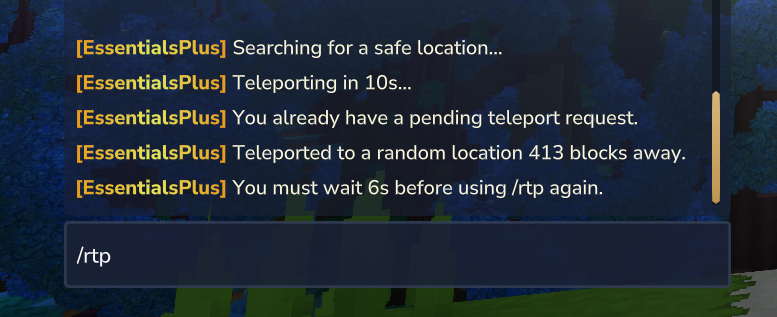
Description: Teleport to a random safe location within a configured radius
Aliases: /randomtp, /wild
Permissions:
essentialsplus.rtp- Use RTP commandessentialsplus.rtp.other- Teleport other playersessentialsplus.rtp.customRadius- Use custom radius with --minRadius/--maxRadiusessentialsplus.rtp.minRadius.[value]- Set minimum radius via permission (e.g., .minRadius.500)essentialsplus.rtp.maxRadius.[value]- Set maximum radius via permission (e.g., .maxRadius.10000)
Usage:
/rtp                          # Teleport yourself to random location
/rtp world                    # Teleport to random location in specific world
/rtp nether                   # Teleport to the nether world
/rtp PlayerName               # Admin: Teleport another player (requires .other permission)
/rtp PlayerName world         # Admin: Teleport player to specific world
/rtp --minRadius=1000         # Custom minimum radius (requires .customRadius permission)
/rtp --maxRadius=5000         # Custom maximum radius (requires .customRadius permission)
/rtp --minRadius=500 --maxRadius=10000  # Both custom values
/randomtp                     # Using alias
/wild                         # Using alias
Features:
- Finds a safe random location within configured radius (default: min 100, max 500 blocks)
- Three-Tier Radius Priority System:
- OptionalArgs (
--minRadius=X --maxRadius=Y) withessentialsplus.rtp.customRadiuspermission (highest priority) - Permission-Based Values (
essentialsplus.rtp.minRadius.X,essentialsplus.rtp.maxRadius.Y) (medium priority) - Config Default Values (lowest priority)
- OptionalArgs (
- Performs safety checks to avoid dangerous blocks (lava, water, void)
- Ensures solid ground and enough headroom
- Configurable maximum search attempts (default: 10)
- Configurable RTP center behavior (
useWorldSpawnAsCenter)true(default): random location is calculated around the selected world's spawnfalse: random location is calculated around the target player's current position
- Shows distance traveled after teleportation
- World filtering - only teleport to enabled worlds
- Default world fallback when current world is not listed in enabledWorlds
- Admin feature to teleport other players (separate command variant)
- Optional world parameter to target specific worlds
- Warmup and cooldown support
World Configuration:
Configure enabled worlds and default fallback:
"rtp": {
"useWorldSpawnAsCenter": true,
"minRadius": 100,
"maxRadius": 500,
"maxChecks": 10,
"enabledWorlds": ["world", "mine"], // Specific worlds enabled
// OR
"enabledWorlds": ["*"], // All worlds enabled (default)
"defaultWorld": {
"enabled": true, // Enable fallback to default world, if the player is not in a "enabledWorlds" world
"name": "default"                  // Default world name
}
}
Output:
- Searching:
Searching for a safe location... - Success:
Teleported to a random location X blocks away. - Admin success:
PlayerName was teleported to a random location X blocks away. - World not allowed:
RTP is not allowed in world 'worldname'. - Fallback:
RTP not allowed in current world, teleporting to default world 'world' instead.
Error Messages:
- Disabled:
Random teleport is currently disabled. - No safe location:
Could not find a safe location after X attempts. Please try again. - World not found:
World 'worldname' not found. - Player not found:
Player not found.
Configuration:
The RTP system can be configured in config.json:
"rtp": {
"useWorldSpawnAsCenter": true,
"minRadius": 100,
"maxRadius": 500,
"maxChecks": 10
}
/adminchat [Message]
Description: Send a message to all online administrators
Aliases: /a
Permission: essentialsplus.adminchat
Parameters:
[Message](Required) - The message to send
Usage:
/adminchat Check spawn area please
/a Need help with griefer          # Using alias
Features:
- Only visible to players with admin permission
- Useful for staff coordination
- Works from console
Error Messages:
- No message:
Usage: /adminchat [message]
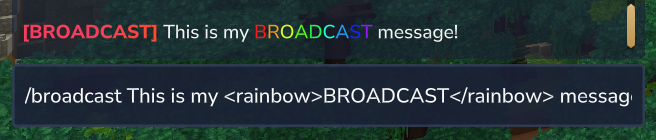
/broadcast [Message]
Description: Send a server-wide broadcast message
Aliases: /bc, /alert, /bcast
Permission: essentialsplus.broadcast
Parameters:
[Message](Required) - The broadcast message
Usage:
/broadcast Server restart in 5 minutes
/bc Please vote for our server!
/alert Important announcement
Features:
- Visible to all online players
- Formatted with
[BROADCAST]prefix in red - Supports color codes and formatting
- Works from console
Vanish System
The vanish system allows players to become invisible to other players on the server.
/vanish
Description: Toggle vanish mode for yourself
Aliases: /evanish, /v
Permission: essentialsplus.vanish.self
Usage:
/vanish
/v
Features:
- Makes you completely invisible to other players
- Players cannot see you in tab list or in-game
- Toggle on/off by running the command again
Messages:
- Vanish enabled:
Vanish mode enabled. - Vanish disabled:
Vanish mode disabled.
/vanish [Player]
Description: Toggle vanish mode for another player
Aliases: /evanish [Player], /v [Player]
Permission: essentialsplus.vanish.other
Parameters:
[Player](Required) - Target player
Usage:
/vanish Steve
/v Alex
Messages:
- Vanish enabled:
Vanish mode enabled for {player}. - Vanish disabled:
Vanish mode disabled for {player}.
Freeze System
The freeze system allows moderators to freeze players in place, preventing all movement.
/freeze
Description: Toggle freeze mode for yourself
Aliases: /efreeze
Permission: essentialsplus.freeze.self
Usage:
/freezeFeatures:
- Prevents all movement (walking, jumping, flying)
- Toggle on/off by running the command again
Messages:
- Freeze enabled:
Freeze mode enabled. - Freeze disabled:
Freeze mode disabled.
/freeze [Player]
Description: Toggle freeze mode for another player
Aliases: /efreeze [Player]
Permission: essentialsplus.freeze.other
Parameters:
[Player](Required) - Target player
Usage:
/freeze Steve
/freeze Alex
Messages:
- Freeze enabled:
Freeze mode enabled for {player}. - Freeze disabled:
Freeze mode disabled for {player}.
/freeze all
Description: Freeze all players on the server
Aliases: /efreeze all
Permission: essentialsplus.freeze.all
Usage:
/freeze allMessages:
- All players frozen:
All players have been frozen.
Announcement System
The announcement system allows server administrators to create, manage, and schedule automated server announcements with various display options including chat messages, titles, sounds, particles, and server commands.
/announce
Description: Shows the announcement system usage and available commands
Aliases: /announcements, /bc, /announcement, /announcer
Permission: essentialsplus.announce
Usage:
/announce                  # Shows usage information
/announcements             # Using alias
/announcer                 # Using alias
Features:
- Displays all available announcement subcommands
- Shows usage syntax for each command
- Base permission required for announcement system access
Output:
Announcement System Commands:
/announce send [id] [player] - Send specific announcement
/announce add [name] [message] - Create new announcement
/announce remove [name] - Remove announcement
/announce list [page] - List all announcements
/announce reload - Reload system from JSON
/announce toggle - Enable/disable system
/announce send [id] [player]
Description: Manually send a specific announcement to all players or a specific player
Aliases: /eannounce send [id] [player]
Permission: essentialsplus.announce.send.all
Parameters:
[id](Required) - Name/ID of the announcement to send[player](Optional) - Specific player to send to (default: all players)
Usage:
/announce send congratulations       # Send "congratulations" announcement to all
/announce send event_reminder Player1 # Send "event_reminder" to Player1
/eannounce send vip_announcement     # Using e-alias
Try These Default Examples:
EssentialsPlus comes with several pre-configured example announcements. Try them out to see how the system works:
/announce send congratulations        # Active by default - welcome message
/announce send event_reminder         # Disabled by default - event notification with title & sound
/announce send vip_announcement       # Disabled by default - VIP-only message (requires permission)
/announce send daily_bonus            # Disabled by default - bonus with command execution
/announce send server_tip             # Disabled by default - helpful server tip
/announce send welcome_back           # Disabled by default - welcome back message with rewards
Default Announcements
The congratulations announcement is enabled by default to welcome you to EssentialsPlus! All other example announcements are disabled by default and serve as templates. You can enable them by editing announcements.json or disable the congratulations message if you prefer.
Features:
- Executes announcement immediately with all configured effects
- Supports titles, chat messages, sounds, particles, and server commands
- Can target specific player or broadcast to all
- Bypasses automatic scheduling - manual execution only
- Console command execution support for server-wide actions
- Only enabled announcements are sent (disabled ones will show an error)
Output:
- Success:
Sent announcement 'congratulations' to all players./Sent announcement 'event_reminder' to Player1. - Target notification varies based on announcement configuration
Error Messages:
- Announcement not found:
Announcement 'xyz' not found. - Announcement disabled:
Announcement 'xyz' is disabled. - Player not found:
Player 'xyz' not found. - System not loaded:
Announcement system is not loaded.
/announce add [name] [message]
Description: Create a new announcement with specified name and chat message
Aliases: /eannounce add [name] [message]
Permission: essentialsplus.announce.add
Parameters:
[name](Required) - Unique name for the announcement[message](Required) - Chat message content (supports color codes)
Usage:
/announce add welcome "Welcome to our server!"
/announce add rules "Please read /rules before playing"
/eannounce add event "Special event starting now!"
Features:
- Creates basic announcement with chat message
- Automatically saves to announcements.json
- Supports hex color codes (#FF0000) and Hytale color tags
- Default configuration: no title, sound, particles, or commands
- Can be enhanced by manually editing the JSON file
JSON Structure Created:
{
  "name": {
    "chatMessage": "message content",
    "title": null,
    "sound": null,
    "particle": null,
    "commands": [],
    "interval": "5m"
  }
}
Output:
- Success:
Created announcement 'welcome' with message: "Welcome to our server!"
Error Messages:
- Name already exists:
Announcement 'welcome' already exists. - Invalid usage:
Usage: /announce add [name] [message] - System not loaded:
Announcement system is not loaded.
/announce remove [name]
Description: Remove an existing announcement from the system
Aliases: /eannounce remove [name], /announce delete [name], /eannounce delete [name]
Permission: essentialsplus.announce.remove
Parameters:
[name](Required) - Name of the announcement to remove
Usage:
/announce remove welcome           # Remove "welcome" announcement
/announce delete oldEvent          # Using delete alias
/eannounce remove seasonal         # Using e-alias
Features:
- Permanently removes announcement from configuration
- Automatically saves changes to announcements.json
- Stops any scheduled execution of the announcement
- Cannot be undone without manual restoration
Output:
- Success:
Removed announcement 'welcome'.
Error Messages:
- Announcement not found:
Announcement 'welcome' not found. - System not loaded:
Announcement system is not loaded.
/announce list [page]
Description: Display all configured announcements with pagination
Aliases: /eannounce list [page], /announce ls [page], /eannounce ls [page]
Permission: essentialsplus.announce.list
Parameters:
[page](Optional) - Page number for pagination (default: 1)
Usage:
/announce list                     # Show first page
/announce list 2                   # Show page 2
/announce ls                       # Using ls alias
/eannounce list                    # Using e-alias
Features:
- Shows 10 announcements per page
- Displays announcement name, chat message preview, and interval
- Color-coded output with page navigation
- Shows total count and current page information
Output:
═══ Announcements (Page 1/2) ═══
1. welcome
   Message: "Welcome to our server!"
   Interval: 5 minutes

2. rules
   Message: "Please read /rules before..."
   Interval: 10 minutes

═══ Use '/announce list 2' for next page ═══
Total: 15 announcements
Error Messages:
- No announcements:
No announcements configured. - Invalid page:
Page 5 does not exist. Total pages: 2 - System not loaded:
Announcement system is not loaded.
/announce reload
Description: Reload the announcement system configuration from announcements.json
Aliases: /eannounce reload
Permission: essentialsplus.announce.reload
Usage:
/announce reload               # Reload configuration
/eannounce reload              # Using e-alias
Features:
- Completely reloads announcements.json from disk
- Stops current scheduler and restarts with new configuration
- Validates all announcement configurations
- Preserves system enabled/disabled state
- Shows detailed reload information including announcement count
Process:
- Shuts down current announcement scheduler
- Reloads configuration from announcements.json file
- Updates AnnouncementManager with new data
- Restarts scheduler with new settings
- Validates all loaded announcements
Output:
- Success:
Announcement system reloaded successfully. Loaded 5 announcements. - Detailed info about scheduler restart and validation
Error Messages:
- File not found:
announcements.json not found. Creating default configuration. - Invalid JSON:
Error reading announcements.json: [error details] - Reload failed:
Failed to reload announcement system: [error details]
/announce toggle
Description: Enable or disable the announcement system
Aliases: /eannounce toggle
Permission: essentialsplus.announce.toggle
Usage:
/announce toggle               # Toggle system on/off
/eannounce toggle              # Using e-alias
Features:
- Toggles the entire announcement system on or off
- When disabled: stops all automatic announcements
- When enabled: restarts automatic scheduling
- Manual announcements (/announce send) work regardless of toggle state
- State persists across server restarts
Output:
- Enabled:
Announcement system enabled. Automatic announcements will now run. - Disabled:
Announcement system disabled. Automatic announcements stopped.
Notes:
- Does not affect manual announcement sending
- Scheduler is completely stopped when disabled to save resources
- Configuration remains loaded for manual commands and immediate re-enabling
Announcement Configuration:
Announcements are stored in announcements.json with the following structure:
{
  "enabled": true,
  "announcements": {
    "welcome": {
      "chatMessage": "[green]Welcome to our server![/green]",
      "title": {
        "text": "[yellow]Welcome![/yellow]",
        "fadeIn": "1s",
        "stay": "3s",
        "fadeOut": "1s"
      },
      "sound": {
        "name": "entity.experience_orb.pickup",
        "volume": 1.0,
        "pitch": 1.0
      },
      "particle": {
        "type": "FIREWORKS_SPARK",
        "color": "#00FF00",
        "count": 20,
        "spread": 2.0
      },
      "commands": [
        "say Welcome everyone!",
        "effect give @a minecraft:speed 30 1"
      ],
      "interval": "5m"
    }
  }
}
Time Formats:
- Supports seconds (s), minutes (m), hours (h):
30s,5m,2h - Examples:
10s,1.5m,2h,90s
Color Support:
- Hex colors:
#FF0000,#00FF00,#0080FF - Hytale color tags:
[red],[green],[yellow],[white]
WorldBorder Commands
/worldborder create square [minX] [minZ] [maxX] [maxZ] - Create Square Border
Description: Creates a rectangular world border for the current world
Aliases: /wb create square, /border create square, /eworldborder create square
Permission: essentialsplus.worldborder.create
Parameters:
[minX](Required) - Minimum X coordinate[minZ](Required) - Minimum Z coordinate[maxX](Required) - Maximum X coordinate[maxZ](Required) - Maximum Z coordinate--mode=[MODE](Optional) - Enforcement mode:INVISIBLE_WALL,TELEPORT, orDAMAGE(default:INVISIBLE_WALL)
Usage:
/worldborder create square -1000 -1000 1000 1000
/worldborder create square -500 -500 500 500 --mode=TELEPORT
/worldborder create square 0 0 2000 2000 --mode=DAMAGE --damage=2
/worldborder create round [radius] - Create Round Border
Description: Creates a circular world border centered at your current position
Aliases: /wb create round, /border create round, /eworldborder create round
Permission: essentialsplus.worldborder.create
Parameters:
[radius](Required) - Radius of the circular border in blocks--mode=[MODE](Optional) - Enforcement mode:INVISIBLE_WALL,TELEPORT, orDAMAGE(default:INVISIBLE_WALL)
Usage:
/worldborder create round 1000
/worldborder create round 5000 --mode=INVISIBLE_WALL
/worldborder create round 2500 --mode=DAMAGE --damage=0.5 --warning=100
Notes:
- The border center is set to your current position when creating the border
- Stand at the desired center point before executing the command
/worldborder remove - Remove World Border
Description: Removes the world border from the current world
Aliases: /wb remove, /border remove, /worldborder delete, /wb del
Permission: essentialsplus.worldborder.remove
Usage:
/worldborder removeOutput:
- Success:
World border removed for world 'world'. - Error:
No world border exists for world 'world'.
/worldborder info - Display Border Information
Description: Shows detailed information about the current world's border
Aliases: /wb info, /border info
Permission: essentialsplus.worldborder.info
Usage:
/worldborder infoOutput Example (Round Border):
=== World Border: world ===
  Shape: Round
  Center: X: 100.0, Z: -50.0
  Radius: 1000.0 blocks
  Enforcement: INVISIBLE_WALL
  Warning Distance: 50.0 blocks
Output Example (Square Border):
=== World Border: world ===
  Shape: Square
  Coordinates: X: -1000.0 to 1000.0, Z: -1000.0 to 1000.0
  Enforcement: DAMAGE
  Damage: 1.0 every 1000ms
  Warning Distance: 50.0 blocks
/worldborder list - List All Borders
Description: Lists all configured world borders across all worlds
Aliases: /wb list, /border list
Permission: essentialsplus.worldborder.list
Usage:
/worldborder listOutput Example:
=== World Borders (3) ===
world - round (center: 0.0, 0.0 | radius: 1000.0) | Mode: INVISIBLE_WALL
world_nether - square (-500.0 to 500.0, -500.0 to 500.0) | Mode: TELEPORT
world_the_end - round (center: 100.0, 100.0 | radius: 2500.0) | Mode: DAMAGE
/worldborder fill - Pre-Generate Chunks
WARNING
⚠️ EXPERIMENTAL — This feature may cause unexpected behaviour.Create a world backup BEFORE running this command. Chunks cannot be recovered without a backup.
Description: Pre-generates all chunks within the world border. Without confirm, shows a preview and an experimental warning. The operation may cause significant server lag.
Aliases: /wb fill, /border fillPermission: essentialsplus.worldborder.fill
Usage:
/worldborder fill              (preview — shows estimated chunk count and experimental warning)
/worldborder fill confirm      (start chunk generation)
/worldborder fill cancel       (cancel a running fill operation)
Features:
- Requires explicit
confirmto prevent accidental execution - Displays an experimental warning block before confirmation (resource usage, cancellation behaviour)
- Runs asynchronously in the background
- Progress updates every 5 seconds
- Can be cancelled at any time (current batch will finish before stopping)
Output Example:
World border fill preview for 'world': Shape: Round (radius: 5000) | Chunks to generate: ~62,832
⚠ EXPERIMENTAL FEATURE — READ BEFORE PROCEEDING ⚠
...
Run /worldborder fill confirm to start chunk generation.

(after confirm)
Starting chunk generation for world 'world'... (~62,832 chunks)
Warning: This operation may cause lag while chunks are being generated.

Generating chunks... 25.5% (16,000/62,832 chunks)
...
Chunk generation complete for world 'world'! (62,832 chunks generated)
/worldborder trim
WARNING
⚠️ EXPERIMENTAL — This feature may delete more chunks than expected or cause unexpected behaviour.Create a world backup BEFORE running this command. Deleted chunks cannot be recovered without a backup.
Permanently deletes all stored chunks that are completely outside the world border. This helps reduce world file size after shrinking a border.
Permission: essentialsplus.worldborder.trim
Aliases: prune, cleanup
Usage:
/worldborder trim              (preview — shows estimate and full experimental warning)
/worldborder trim confirm      (start the deletion)
/worldborder trim cancel       (cancel a running trim operation)
How it works:
Only chunks where the entire chunk area is outside the border are deleted — chunks that partially overlap with the border are kept.
Output Example:
World border trim preview for 'world':
  Border: Round (radius: 5000)
  Chunks to delete: 12,450
Run /worldborder trim confirm to start the deletion.

(after confirm)
Starting chunk trimming for world 'world'...
  Estimated chunks to delete: 12,450
Warning: This operation permanently deletes chunks outside the border.

Trimming chunks... 50.0% (6,225/12,450 chunks deleted)

Chunk trimming complete for world 'world'!
  Deleted chunks: 12,448
2 chunk(s) were skipped because they are still loaded in memory.
WorldBorder Enforcement Modes
INVISIBLE_WALL
- Players cannot cross the border
- Teleported back to their previous valid position
- If previous position is also outside, teleported to spawn
- Recommended for most servers
TELEPORT
- Players are immediately teleported to spawn when crossing the border
- More jarring than INVISIBLE_WALL
- Useful for strict boundaries
DAMAGE
- Players can cross the border but take continuous damage
- Damage amount and interval are configurable
- Players can choose to venture outside at their own risk
- Useful for soft boundaries
WorldBorder Bypass Permission
Players with the permission essentialsplus.worldborder.bypass can:
- Cross world borders without restriction
- Use teleport commands to locations outside borders
- Not affected by any enforcement mode
This is useful for:
- Server administrators
- Builders working on world edges
- Event coordinators needing unrestricted access
General Commands
/essentialsplus
Description: Displays plugin information, version and links
Aliases: None
Permission: None (publicly available)
Usage:
/essentialsplusOutput:
- Plugin version
- Link to website
- Discord server invite link
/essentialsplus reload
Description: Reloads the plugin configuration, including all language files, config settings, and other data files
Aliases: None
Permission: essentialsplus.reload
Usage:
/essentialsplus reloadFeatures:
- Reloads all configuration files without restarting the server
- Reloads all language files
- Changes take effect immediately
Migration Commands
/essentialsplus migrate [Mod] [Merge]
Description: Migrate data from other Essentials mods
Aliases: None
Permission: essentialsplus.migrate
Parameters:
[Mod](Required) - Source mod name (hyssentials,eliteessentials,essentialscore,homesplus,homemanager,kuksohywarps,hyessentialsx,hythomes,kgwarps,hycommands, ortheeconomy)[Merge](Required) - Merge mode (truefor merge,falsefor replace)
Usage:
/essentialsplus migrate hyssentials true
/essentialsplus migrate eliteessentials false
/essentialsplus migrate essentialscore true
/essentialsplus migrate homesplus true
/essentialsplus migrate homemanager true
/essentialsplus migrate kuksohywarps true
/essentialsplus migrate hyessentialsx true
/essentialsplus migrate hythomes true
/essentialsplus migrate kgwarps true
/essentialsplus migrate hycommands true
/essentialsplus migrate theeconomy true
Features:
- Migrates warps, homes, spawns, and user data
true- Merge mode: Combines data with existing datafalse- Replace mode: Replaces all existing data- Automatic backup before migration
- Detailed progress messages during migration
Messages:
- Starting migration:
Starting migration from Hyssentials... - Success:
Migration completed successfully! - Backup created:
Backup created at: backup-YYYY-MM-DD-HH-mm-ss/
See also: Migration Tutorial for detailed step-by-step instructions.